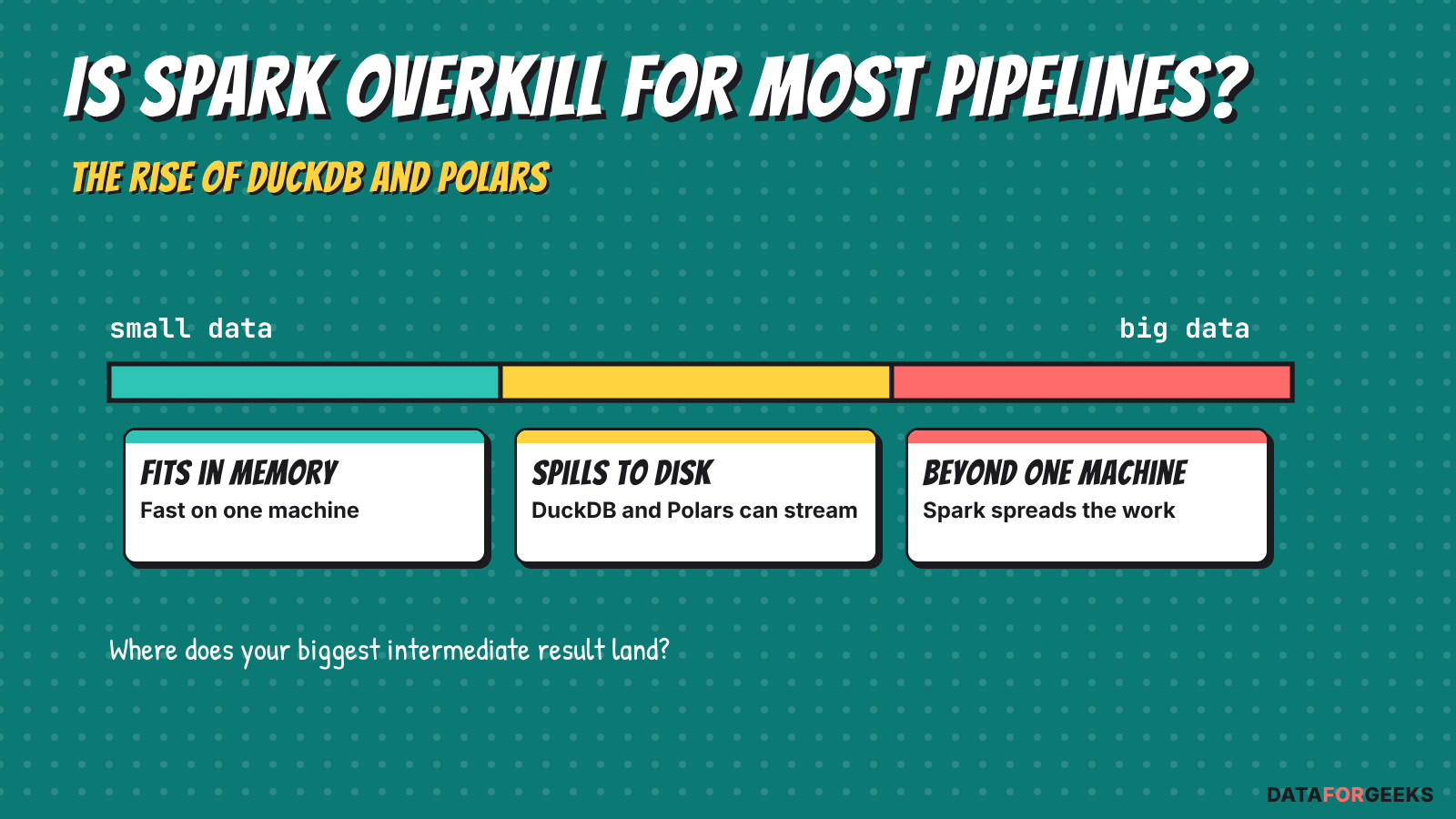
For most pipelines, Spark is overkill. Not every organisation has 100 GB or more to process per pipeline. A typical nightly job reads yesterday’s partition, filters it, joins a small lookup table and writes a summary, so the working set is a few gigabytes. Spark spreads data that doesn’t fit on one machine across many. When the data does fit, you still pay for the cluster, its start-up and its idle workers. Niels Claeys of Data Minded estimates that 80 to 90% of his customers’ use cases are small or medium data, with about 100 GB as the line to large. (Claeys talk) Spark isn’t a bad tool, but it’s the right one for fewer jobs than most teams assume.
Before your nightly Spark job reads a single row, a cluster has to wake up. For a job that reads 20 GB and writes 1,200 rows, that wait can be a big part of the run.
Is Spark overkill for most pipelines? It comes down to size. Spark’s fixed costs (cluster start, billing minimums, idle workers) dominate small jobs, while a single-node data processing engine like DuckDB or Polars starts in seconds and reads Parquet and Iceberg directly. Below I’ve collected what other engineers measured, added real AWS and Databricks prices, and noted where Spark still wins.
📌 TL;DR
Spark is overkill for many daily jobs that fit on one machine: DuckDB and Polars are usually faster to start, cheaper and simpler to run than Spark. Independent tests found 3x to 4x at 40 GB and on small files. Around 100 GB the evidence is thin and mixed, and beyond one machine Spark wins.
Yes, this is a long read, on purpose: along the way you’ll pick up how Spark is billed, what a single-node engine does differently, and how to size your own job. Short on time? Use the boxes below.
In my posts on Spark performance tuning and data skew, the hard part was always deciding which knob to turn. This post asks one question before the knobs: is Spark overkill for this job, or does it need a cluster at all?
By the end you’ll be able to:
- explain why a small Spark job costs what it does, using one worked example;
- read the DuckDB, Polars and Spark benchmarks and tell which ones are vendor claims;
- estimate the yearly cost of your own job on Glue, EMR Serverless, Databricks and a single machine;
- choose between DuckDB, Polars and Spark with a short decision ladder;
- run the same job in DuckDB and Polars and check that the results match.
IN A HURRY? THE WHOLE STORY IN FIVE LINES
- Small jobs pay Spark’s fixed costs: minutes of cluster start, a billing minimum, and workers that sit idle.
- Independent tests found DuckDB 3.4x to 4.1x faster at 40 GB and on small files. At 100 GB, one test had it winning most queries and running out of memory on one.
- In the worked example, right-sizing Spark saves most of the money. Switching engines saves the rest. On Databricks, serverless removes most of the start-up wait.
- Spark is not overkill beyond one machine, for heavy shuffles, streaming and shared platforms.
- DuckDB 2.0 LTS and Polars 2.0 just shipped. Pin versions and wait for the first patch before moving production jobs.
🧭 How to read this post
- New to the topic? Start at the invoice.
- Know Spark billing? Skip to what people have measured.
- Want the numbers? Go to what one run costs.
- Need a recipe? Jump to try it: one job, two engines.
- Deciding? See pick the engine and where Spark is not overkill.
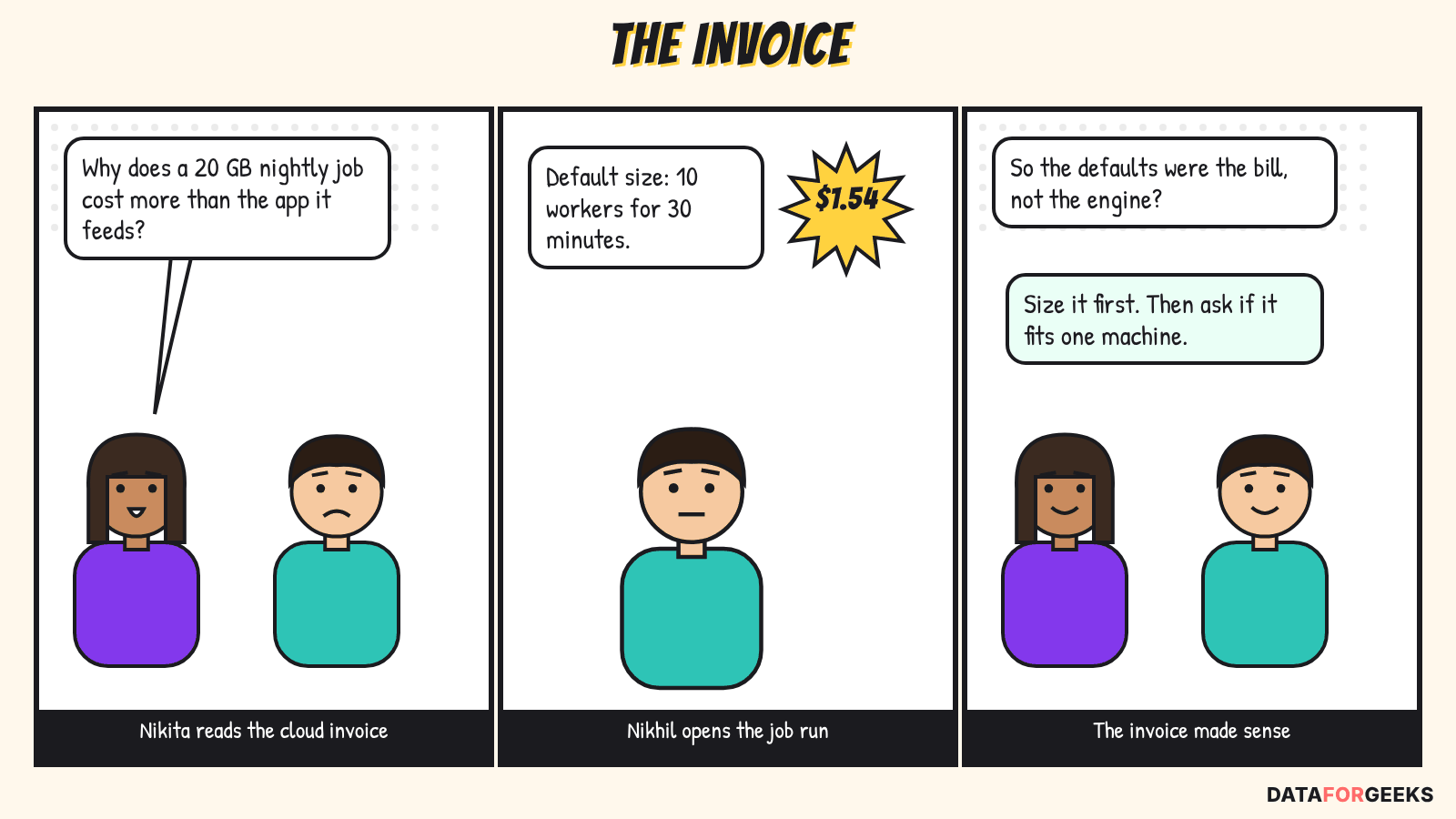
Table of Contents
The invoice: one nightly job, four bills
A small job is one whose working set after filtering, and whose largest intermediate result, both fit comfortably in one machine’s memory. Raw table size is the wrong measure. A 20 GB table filtered to one day may be 2 GB of real work.
Any Spark alternatives test starts with the job, so I’ll use one toy example all the way through. It’s a nightly job on a 20 GB events table in Parquet on S3:
- keep yesterday’s rows;
- join them to a 200 MB
appstable; - aggregate by country and app;
- write the result as partitioned Parquet.
Across teams, reruns and backfills it runs 20 times a day. The AWS prices below are real (us-east-1, on-demand, read from the AWS price lists on 22 October 2026). (AWS Glue, EMR, Fargate) The run times are my assumptions, so replace them with your own.
| Setup | Assumed time | Cost per run | Cost per year at 20 runs a day |
|---|---|---|---|
| Glue Spark, default 10 DPUs | 30 min | $1.54 | $11,242 |
| Glue Spark, right-sized to 2 DPUs | 12 min | $0.12 | $899 |
| EMR Serverless Spark, default size (40 vCPU, 160 GB) | 30 min | $1.51 | $11,058 |
| EMR Serverless Spark, right-sized (8 vCPU, 32 GB) | 12 min | $0.12 | $885 |
| DuckDB on Fargate, 4 vCPU and 16 GB | 5 min | $0.019 | $142 |
The arithmetic is short. Glue 6.0 charges $0.308 per DPU-hour, so ten DPUs for half an hour is 10 × 0.5 × $0.308 = $1.54. (AWS Glue pricing)
EMR Serverless charges $0.052624 per vCPU-hour plus $0.0057785 per GB-hour on x86. One Glue DPU is 4 vCPUs and 16 GB, so ten DPUs match 40 vCPUs and 160 GB, and 2 DPUs match 8 vCPUs and 32 GB. That gives (40 × 0.052624 + 160 × 0.0057785) × 0.5 = $1.51 and (8 × 0.052624 + 32 × 0.0057785) × 12/60 = $0.12. (AWS EMR pricing)
Fargate charges $0.04048 per vCPU-hour and $0.004445 per GB-hour, so four vCPUs and 16 GB for five minutes is (4 × 0.04048 + 16 × 0.004445) × 5/60 = $0.019. (AWS Fargate pricing)
Databricks isn’t a row here because its bill is in DBUs, and the DBUs a job burns depend on the machines or on serverless’s own sizing, so I haven’t invented a number. One comparison needs no guess: the whole DuckDB run costs $0.019, about 5% of a single serverless Jobs DBU at $0.35. The cost section has the Databricks rates. (Databricks)
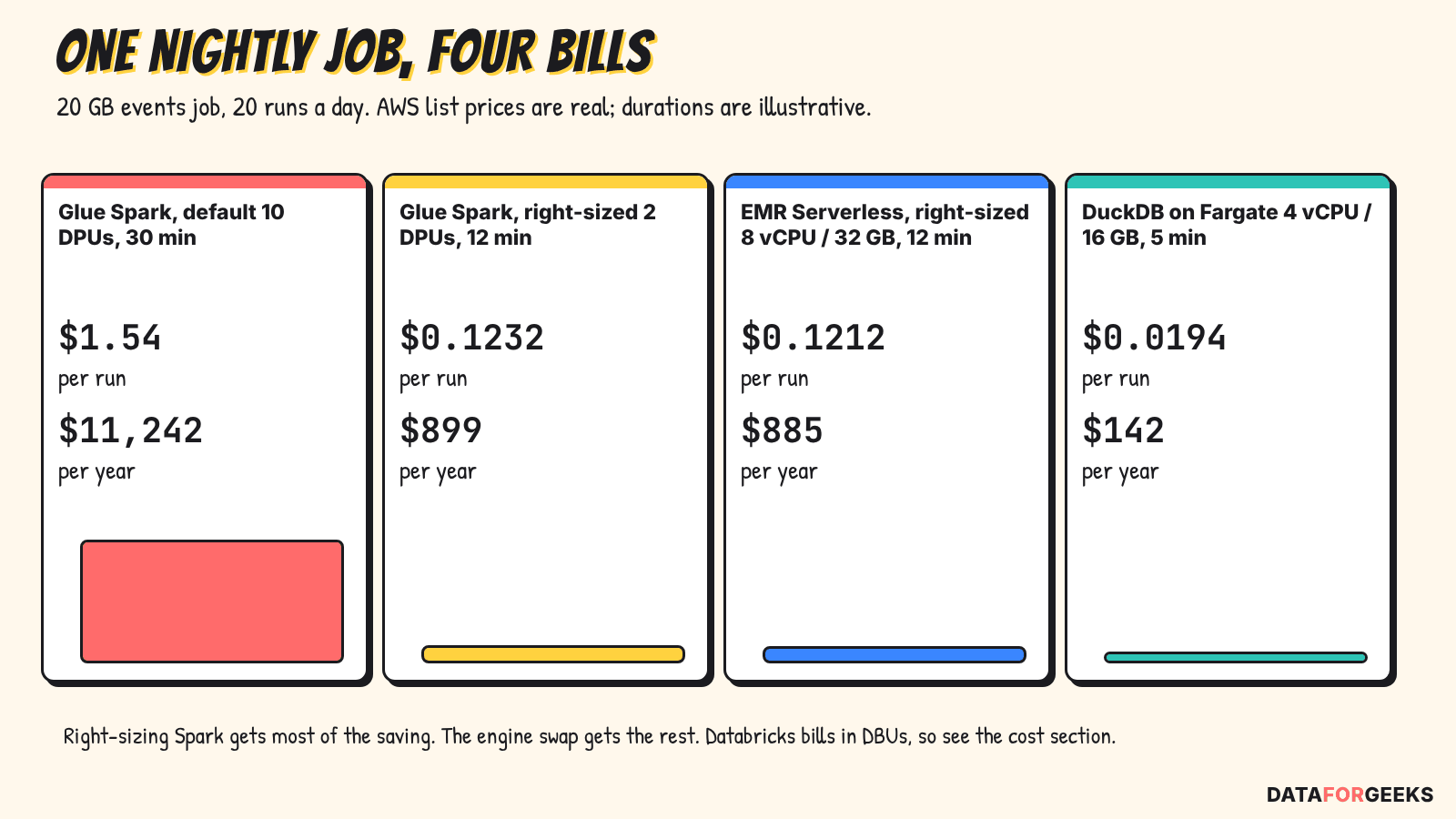
Glue and EMR Serverless land within about 2% of each other at the same size, so pick between them on features. The bigger point: most of the saving, from about $11,000 to about $900, comes from sizing Spark correctly. The engine swap takes off the remaining $743 to $757 a year on this job, and removes the start-up minutes.
🦆 My take:
Before you compare Spark alternatives, compare your job with its own defaults. A Glue job left at ten DPUs for a 2 GB working set is the cheapest thing to fix, and it needs no migration.
Is Spark overkill? Why it overpays on small jobs
Spark was built to spread large data across many machines. That design has costs that don’t shrink when the data does.
Waiting for the cluster
Databricks’ own Jobs pricing page lists start-up times: typically 4 to 6 minutes for classic job clusters and for serverless in standard mode, and under a minute for serverless in performance-optimized mode. (Databricks) Standard mode is the cheaper one, up to 70% cheaper for some workloads according to the same page, so the fast start is something you pay for. (Databricks) On EMR Serverless, AWS says pre-initialized workers start jobs in seconds, and you pay to keep that pool warm. (AWS docs) One practitioner measured 22 to 23 seconds for DuckDB on Fargate. (Matt Martin)
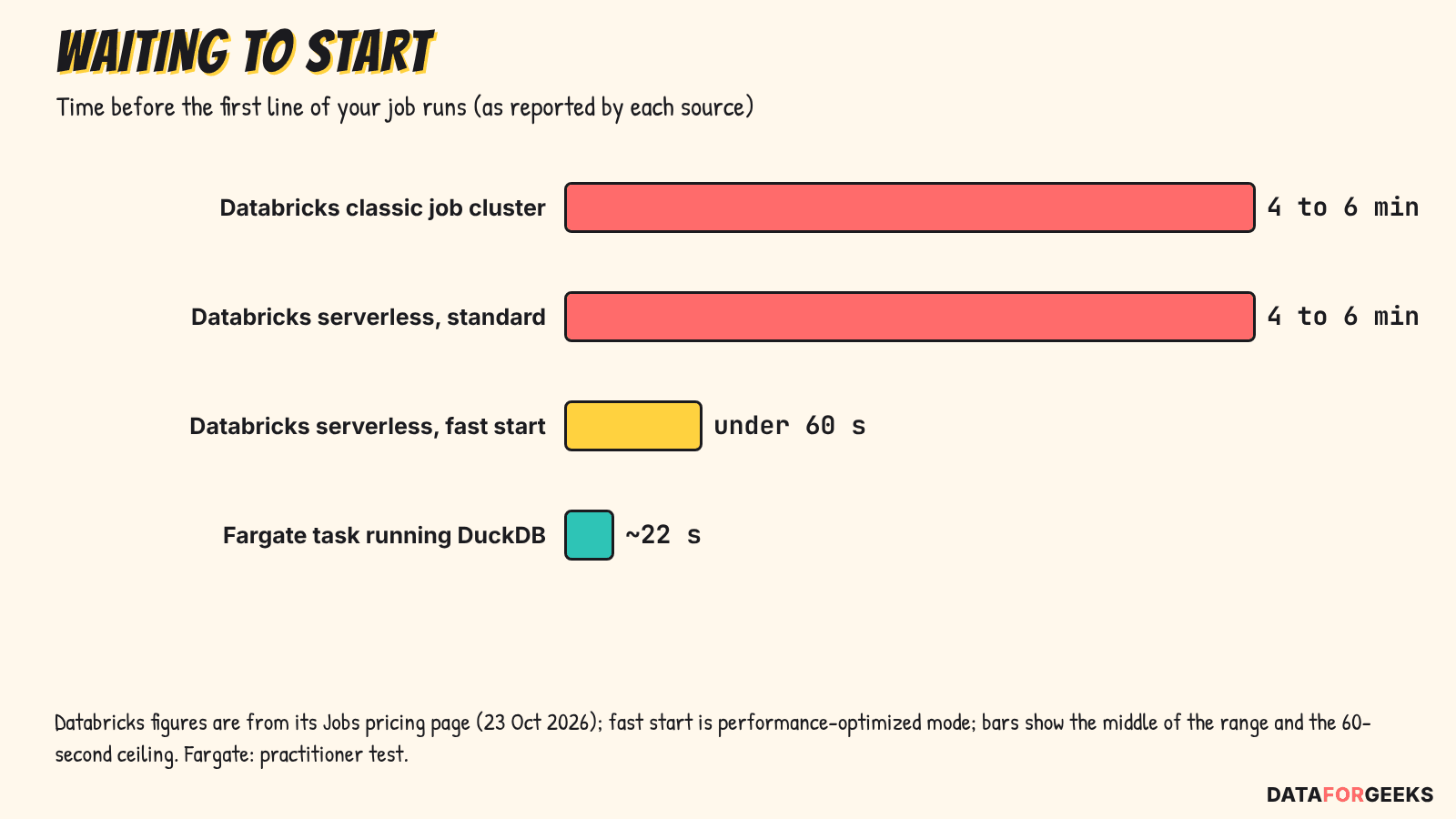
The sources differ in setup, so read the chart as an order of magnitude. In any Spark overkill debate you pay before your first line runs, in waiting or in warm capacity.
Billing floors and idle workers
Serverless Spark bills per second after a minimum. Databricks says serverless is billed with a one-minute minimum, and AWS’s own Glue 6.0 post on DuckDB shows a 56-second run billed as 60 seconds, which points to the same minimum on Glue. (Databricks, AWS blog) Check the pricing page for your Glue version before you quote that.
An always-on cluster costs more. A single r7g.16xlarge (64 vCPU, 512 GiB) at $3.4272 an hour is about $2,502 a month if you leave it running. The same capacity on EMR Serverless is about $6.33 an hour on x86 and $5.06 on Graviton, so one large virtual machine is roughly 1.5 to 1.85 times cheaper per hour before any speed difference. (AWS pricing)
Defaults that weren’t made for small data
Glue jobs start at ten DPUs. spark.sql.shuffle.partitions still defaults to 200, although adaptive query execution (on by default since Spark 3.2) now merges small partitions and splits skewed ones. Much of the old tuning pain is automatic now. What’s left is the fixed cost of a cluster to start, pay for and watch. My Spark performance tuning guide covers the knobs that still matter.
Spark overkill or not? What people have measured
The most reliable evidence comes from engineers who ran the comparison themselves and published their setup. I’ve kept independent tests apart from vendor-reported ones, because the biggest ratios you’ll see in DuckDB vs Spark and Polars vs Spark claims (6x, 15x, 30x) mostly come from the vendors.
Independent tests
| Who | Setup | Result | Caveat |
|---|---|---|---|
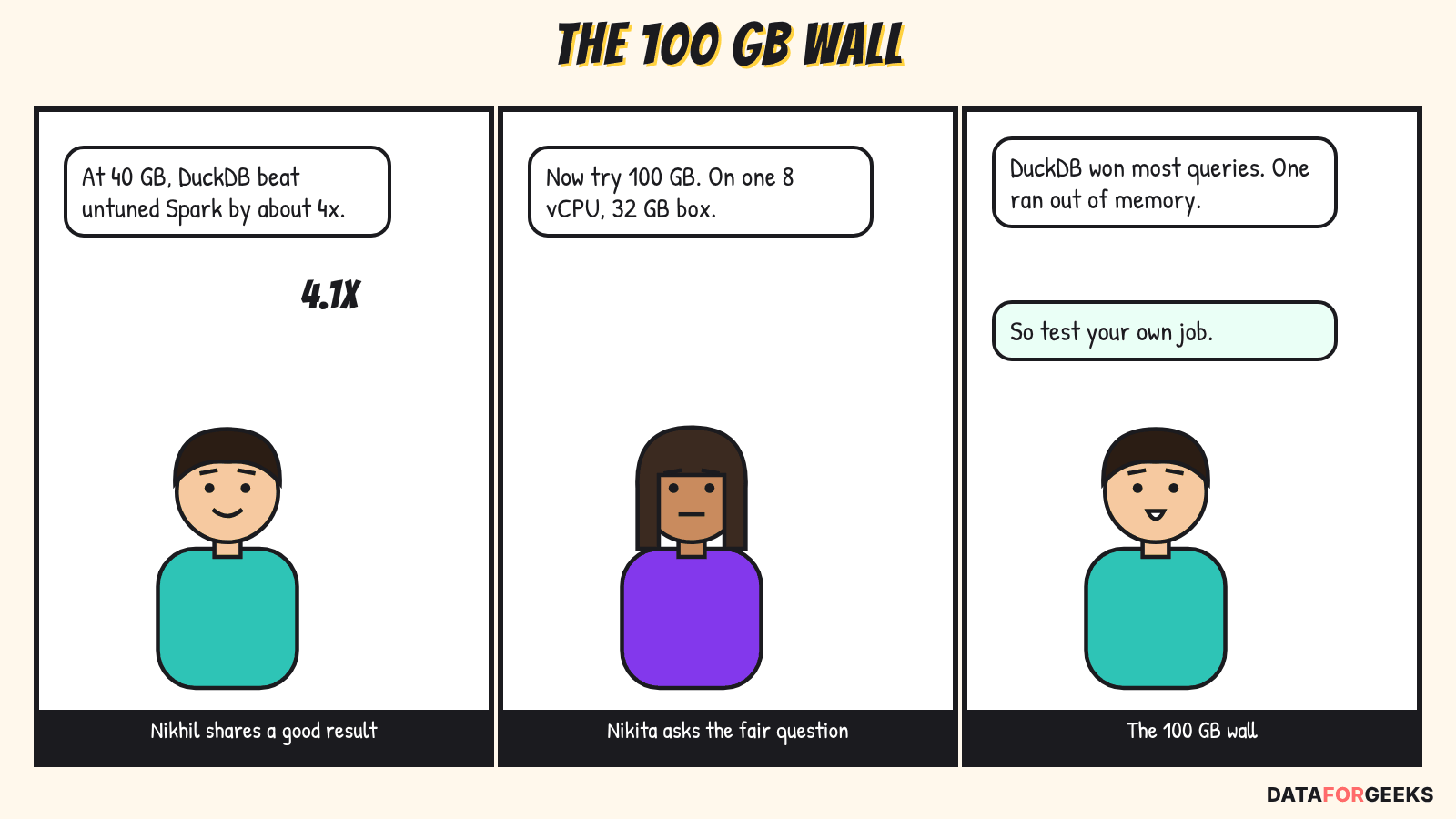
| Digital Turbine, Mar 2025 | About 40 GiB Parquet aggregation on one 16-core, 64 GB machine | DuckDB 3.99 s against Spark 16.39 s (4.1x). Peak memory about 197 MB against 1.65 GB. | Spark was untuned. They keep Spark for work beyond one machine. |
| Matt Martin, Aug 2026 | 1,000 small JSON files on S3 | DuckDB on Fargate (2 vCPU, 4 GB) 48.8 s against EMR Serverless 167.5 s (3.4x), startup excluded, three runs. | Part of the gap is attributed to file skew. |
| Niels Claeys, Data Minded, talk hosted by MotherDuck | 100 GB of TPC-DS on one node with 8 vCPUs and 32 GB | DuckDB beat Spark on most of about 100 queries, with more than half finishing within 15 seconds, and ran out of memory on the last one. | The host sells DuckDB and says its size guidance reflects 2023 limits. No dollar figures. |
| codecentric, Jan 2026 | DuckDB against Polars, no Spark | DuckDB streamed about 2 TB of Parquet on a 32 GB laptop. A 140 GB file peaked at about 1.3 GB for DuckDB against about 17 GB for default Polars. | Memory behaviour only. |
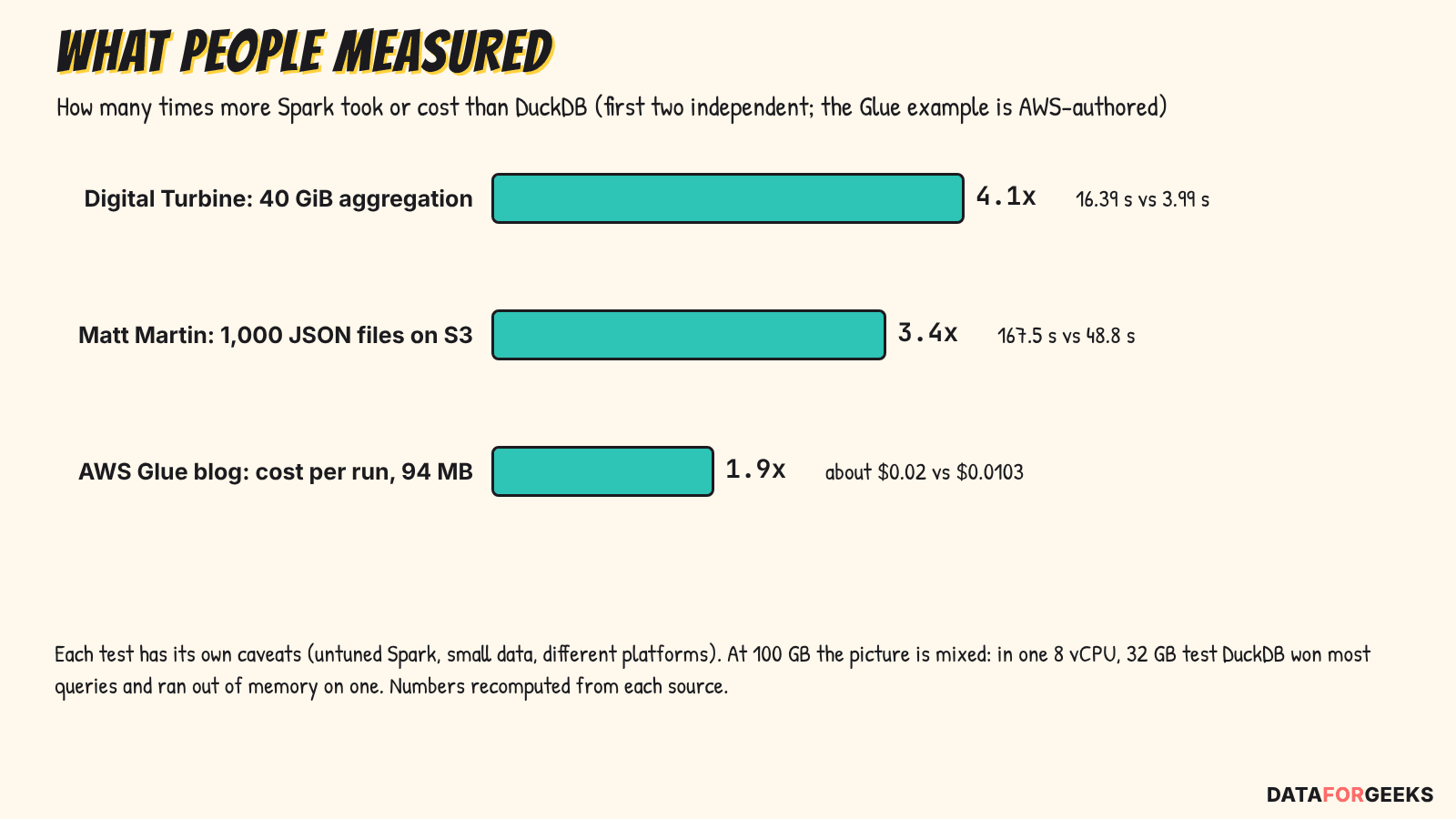
AWS ran a small version on its own platform. In the AWS Big Data Blog post on Glue 6.0 with DuckDB, about 8.4 million rows (about 94 MB) cost $0.0103 per run on DuckDB against about $0.02 on Spark. That’s about 2x, and partly the one-minute minimum.
Polars vs Spark: the vendor-reported results
The Polars team has published two benchmarks. Read them as the vendor’s view, not independent proof.
- May 2025 (Polars 1.30, DuckDB 1.3, PySpark 4.0, 96 vCPUs). At scale factor 100 the totals were DuckDB 19.65 s, Polars streaming 23.94 s, Polars in-memory 152.27 s and PySpark 312.43 s. DuckDB beat Polars there, and Polars’ engine mode (streaming or in-memory) mattered more than the engine.
- June 2026 at scale factor 1,000: 6.4x faster on a single node and 3.2x faster distributed on S3. The vendor also sells Polars Cloud.
Fivetran’s CEO also ran DuckDB on an iPhone against Databricks serverless SQL. He calls it a stunt, Fivetran sells this architecture, and the numbers are chart-only, so I wouldn’t call it evidence.
Databricks and the gaps in the evidence
I looked for an independent DuckDB vs Spark run on Databricks Jobs with a bill attached, and found none. What exists is Databricks’ own price list and start-up figures (used in this post), the Fivetran test above, and community discussion such as the thread in the Spark section. Two more gaps: no independent 2025 or 2026 run includes Spark 4.x with Photon, Gluten or RAPIDS, and I found no independent measurement of shuffle-heavy joins, skew or window functions against Spark between 100 GB and 1 TB. If you’ve run one, share it.
YOU MIGHT BE WONDERING
Isn’t 100 GB too big for one machine?
Not any more. AWS lists an instance with 32 TiB of memory and 1,920 vCPUs. (AWS docs) The better question is how much memory your largest intermediate result needs. DuckDB spills joins, sorts and aggregations to disk when memory runs out, and the 100 GB TPC-DS test above ran on 8 vCPUs and 32 GB. (Claeys talk)
Spark alternatives and cost: what one run costs
Yearly saving = runs per day × 365 × (Spark cost per run − single-node cost per run) − migration effort. Almost nobody publishes before and after dollars for a Spark to single-node move, so use this formula with list prices and your own durations.
| Service | Price (us-east-1, on-demand, 22 Oct 2026) |
|---|---|
| AWS Glue 6.0 ETL | $0.308 per DPU-hour (30% below the $0.44 of earlier versions) (AWS) |
| EMR Serverless, x86 | $0.052624 per vCPU-hour plus $0.0057785 per GB-hour (AWS) |
| EMR Serverless, Graviton | $0.042094 per vCPU-hour plus $0.004628 per GB-hour (AWS) |
| Fargate, x86 | $0.04048 per vCPU-hour plus $0.004445 per GB-hour (AWS) |
| EC2 r7g.16xlarge | $3.4272 per hour (64 vCPU, 512 GiB) (AWS) |
Databricks bills in DBUs, plus the cloud machines on classic compute. These are the rates on its Jobs pricing page for the Premium plan on AWS in US East (N. Virginia), read on 23 October 2026: (Databricks)
| Databricks Jobs compute | Price (Premium, US East) |
|---|---|
| Jobs Classic | $0.15 per DBU, plus the EC2 machines billed by AWS |
| Jobs Serverless | $0.35 per DBU, compute included; one-minute minimum; no charge for VM start-up |
| Photon on classic clusters | Uses DBUs at 2.9 times the rate of a non-Photon cluster |
The Enterprise plan is $0.20 and $0.45. How many DBUs your job burns depends on the machines you pick, or on serverless’s own sizing, so run the job once and read the DBUs from your usage data. (Databricks) On a classic cluster, Photon only pays off if the job runs more than 2.9 times faster, because the DBUs alone cost that much more. (Databricks) I couldn’t confirm the minimum billing on Glue 6.0 and EMR Serverless on the official pages.
It also matters what you compare against:
- Always-on cluster: the savings can be huge, but they mostly measure oversizing.
- Ephemeral job cluster: the four to six minute start Databricks quotes for classic is time you wait, and the machines are billed by the cloud provider while they boot.
- Serverless per-second billing: about 2x at small sizes, as in the AWS Glue example. Databricks serverless adds a one-minute minimum but doesn’t charge for VM start-up.
💡 Tip:
Lambda works for partition-sized pieces of a job. It allows up to 10,240 MB of memory and of /tmp, with a 900-second limit. (AWS Lambda pricing) A 10 GB function running 5 minutes costs about $0.04 on Arm. Set DuckDB’s memory_limit below the function size and point temp_directory at /tmp.
How the engines are evolving in 2026
The rise of DuckDB and Polars is recent: both shipped 2.0 releases within three weeks of each other, and Spark has been changing too. What each side did this year:
- DuckDB. 2.0.0 LTS came out on 21 October 2026, supported to at least October 2027. It brings Quack (a client-server mode), async I/O for Parquet and CSV, a VARIANT type and a new parser. (DuckDB) DuckLake reached 1.0 on 13 April: a lakehouse format with metadata in a SQL database and data in Parquet. (DuckLake 1.0) The 2.0 announcement also mentions DuckLake 1.1, which I couldn’t see on the release history page yet, so check before relying on it.
- Polars. 2.0.0 reached PyPI on 6 October. Streaming is now the default engine, row order is no longer guaranteed unless you ask for it, and there is an Iceberg sink. (Polars upgrade guide)
- Spark. Glue 6.0 is 30% cheaper and runs Spark 4.1.1, DataFusion Comet reached 1.0.0, and adaptive query execution has handled much of the partition tuning since Spark 3.2. (AWS, Spark docs) On Databricks, performance-optimized serverless now starts in under a minute. (Databricks)
- The tools around them. dbt 2.0.0, released 14 September, bundles a DuckDB adapter in its Fusion engine. (DuckDB blog)
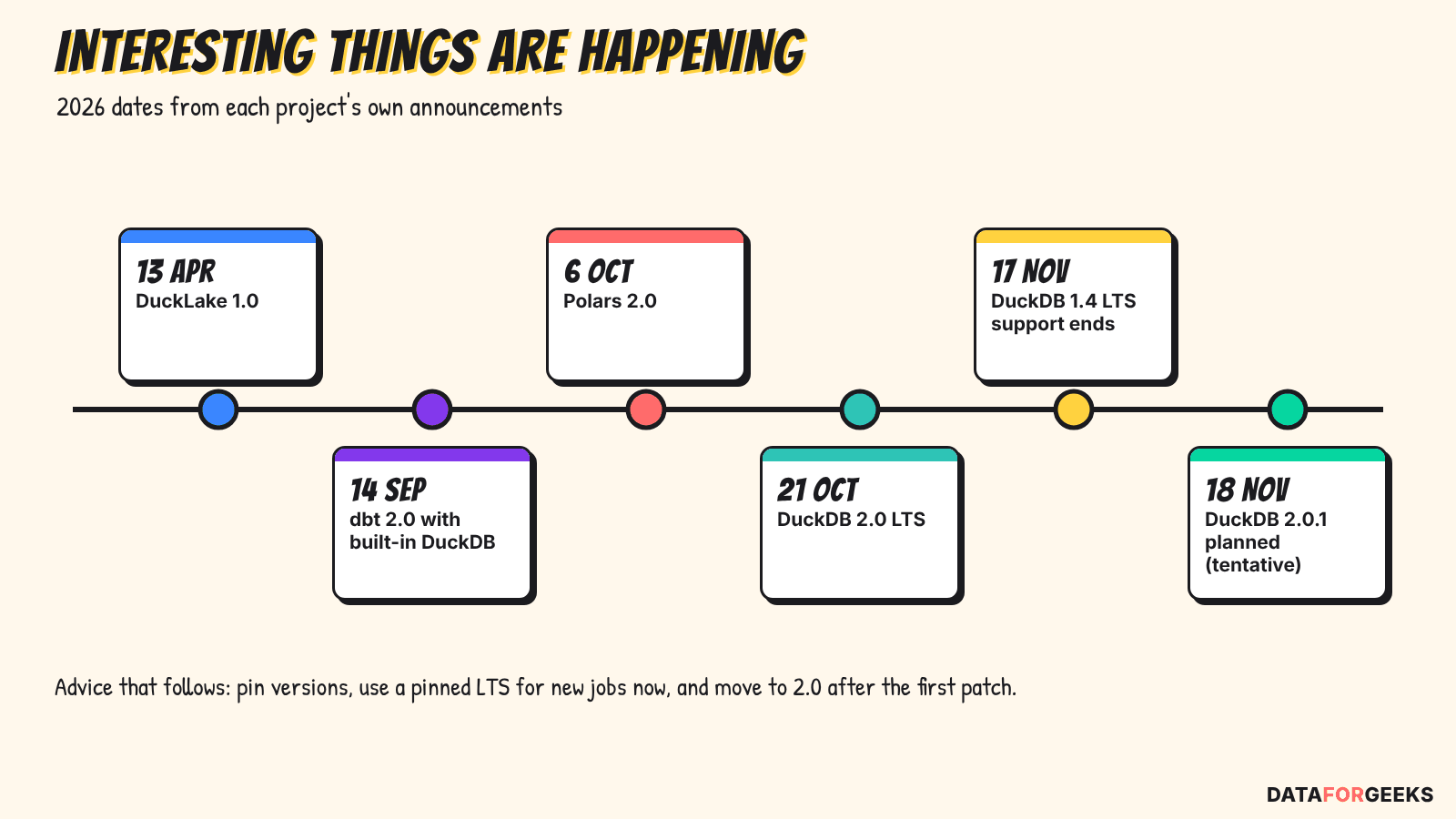
The practical advice is simple. Pin exact versions on your laptop, in CI and in production. DuckDB 1.4 LTS support ends on 17 November, so start new jobs on 1.5 or 2.0. If you want 2.0, wait for the first patch, which the project plans for 18 November (tentative).
DuckDB or Polars? Choosing between Spark alternatives
For single-node data processing under 100 GB, the choice between DuckDB and Polars is mostly about whether your team writes SQL or DataFrames. Both are fast, and the benchmarks above show each winning in different setups.
| Question | Lean DuckDB | Lean Polars |
|---|---|---|
| How does the team write transforms? | SQL | Python DataFrames |
| Memory pressure | Spills grouping, joins, sorting and windows; best memory behaviour in codecentric’s test | Streaming is now the default in 2.0, but out-of-core support is still maturing; in codecentric’s test default Polars peaked at about 17 GB on a 140 GB file, against about 1.3 GB for DuckDB |
| Lakehouse | Iceberg through a catalog, Delta read and append, DuckLake | Iceberg and Delta through external packages; Iceberg sink new in 2.0 |
| Who is behind it | A foundation, MIT licence, LTS releases | A company (Series A), MIT core, commercial cloud |
| Main risk this month | 2.0 is days old: wait for 2.0.1 | 2.0 changes defaults and row order |
The other Spark alternatives get a line each, because no independent 2026 benchmark covers them. Daft is pre-1.0 and has only its own numbers, DataFusion is an engine other tools embed, chDB runs ClickHouse in-process, and Ibis is a portability layer.
What gets annoying after the switch
None of this stops a migration, but I’d want to know it before moving a job.
- Memory. DuckDB’s
memory_limitonly covers its buffer manager, so a query with several heavy operators can still run out of memory, andstring_agg()can’t spill to disk at all. Setmemory_limitandtemp_directoryyourself. - One writer. A DuckDB file takes one writing process at a time. Write Parquet or Iceberg as your output and most of the problem goes away.
- Versions. Files written by DuckDB 2.0 can’t be opened by older versions, and Polars 2.0 no longer guarantees row order unless you ask for it. Pin versions everywhere. When I ran the toy job below on DuckDB 2.0.0,
fetchone()on a relation failed;con.execute(...).fetchone()works.
Spark isn’t maintenance-free either. Spark 4 turned ANSI mode on by default, so a bad cast now throws an error (use try_cast), and Glue 6.0 needs jobs retested. (Spark docs) Whichever way you go, leave time to compare the migrated outputs row by row.
Portability and the SQL thread
Open table formats in the Spark alternatives
DuckDB reads Iceberg, Delta, Lance and DuckLake. It writes Iceberg (insert, update, delete, merge, v3 deletion vectors) only through an attached REST-style catalog such as Glue, S3 Tables, Polaris or Lakekeeper, using merge-on-read. (DuckDB docs) Delta writes are limited to creating a table and appending rows. (DuckDB docs) Polars reads Iceberg and Delta through external packages and gained an Iceberg sink in 2.0. I couldn’t verify Hudi support in any of the three engines, so I’m not claiming it. For background on the formats, see my post on Apache Iceberg.
Keeping your Spark code
YOU MIGHT BE WONDERING
Can I keep my PySpark code and just swap the engine?
Not reliably today. DuckDB’s PySpark-compatible API is marked experimental, gets only bug fixes, and is due to be deprecated in favour of SQLFrame, which didn’t support DuckDB 2.0 yet when I checked. (DuckDB docs) Ibis is the maintained portability layer. SQL is the safest thing to carry over.
Why SQL keeps saving us
Every new data engine of the last fifteen years arrived speaking SQL, so queries and skills carried over instead of being rewritten.
- Hive gave Hadoop a SQL-like language, HiveQL, so analysts didn’t have to write MapReduce in Java.
- Impala from Cloudera went to public beta in October 2012 and was generally available by spring 2013. I wrote about it in Impala partition-level optimisation, next to importing data into HDFS with Sqoop.
- Spark SQL shipped with Spark 1.0 in May 2014. It grew out of Shark, an AMPLab project built on Hive’s codebase, so it has a literal HiveQL lineage.
- DuckDB is SQL first and queries Parquet, Iceberg and Delta files directly. DuckLake even keeps its table metadata in a SQL database.
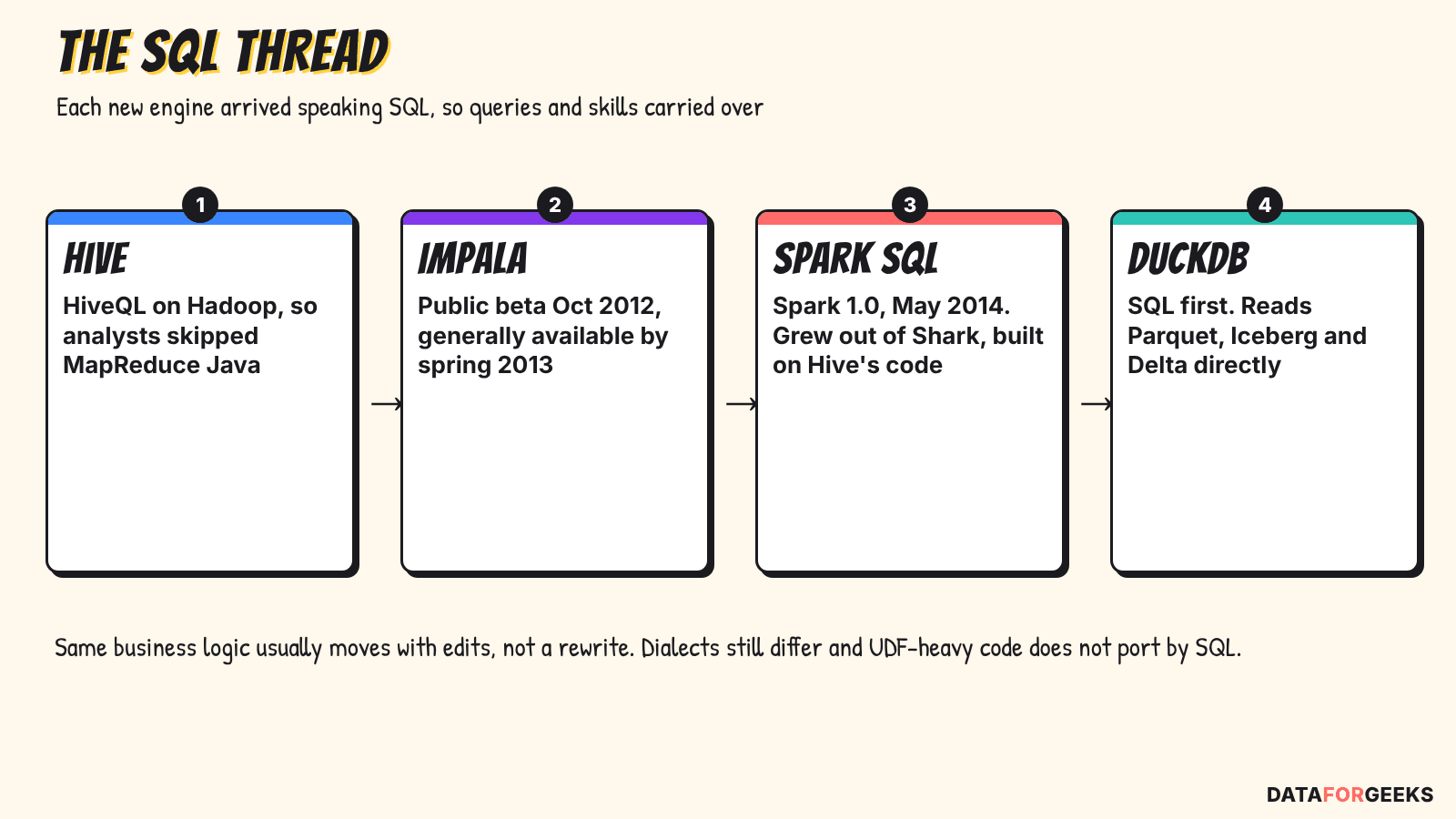
That’s why the same business logic often moves between Spark alternatives with edits instead of a rewrite. It isn’t free: Spark SQL and DuckDB SQL differ in places, and Python UDF-heavy code doesn’t port through SQL.
Where Spark is not overkill
- Data beyond one machine. Coiled’s 2024 TPC-H test (dated, from a Dask vendor) found Spark and Dask about 5x faster than DuckDB at 10 TB, on about 10x the hardware. (Coiled) Single machines are far larger now, but cost and out-of-core behaviour still change.
- Very large joins. A 2026 Apache DataFusion Comet discussion describes vanilla Spark finishing a roughly 319 GB join that an accelerated engine couldn’t. It’s one anecdote, about Comet and not DuckDB, so treat it as a reason to test. (Comet discussion)
- Governance, multi-tenant platforms and streaming. A Databricks community thread argues that one engine avoids doubling your CI/CD, monitoring and skills. It also tells of a 500 MB job moved to a script that later outgrew it and caused an outage.
- Staying on Spark but going faster. On Databricks, performance-optimized serverless starts in under a minute, and standard mode costs up to 70% less for some workloads, so much of the start-up argument is a setting there. (Databricks) In an AWS-authored TPC-DS 3 TB test on EKS, Comet 0.16.0 was 32% faster than vanilla Spark 3.5.8, after being 11% slower in 0.14.0. Comet 1.0.0 supports Spark 3.4 to 4.1. (DataFusion blog)
I found no documented company that moved back from single-node to Spark. That means no public evidence either way, not that nobody did.
Try it: one job, two engines
The fastest way to learn whether your job fits one machine is to run it on one machine. The scripts below build a small stand-in for the nightly job (6 million rows, not 20 GB), run it in DuckDB and in Polars, and check that both give the same answer.
The code was written with the help of Claude to clarify the ideas. It is illustration, not production code. Every snippet was run on DuckDB 2.0.0 and Polars 2.0.0 against the small toy dataset. I didn’t time them against Spark, so this is a correctness check, not a benchmark.
On the toy data both jobs produce the same 1,200 rows: six countries times 200 apps, for 2,000,000 events on the chosen day. The cost script prints the numbers from the first table. Change the durations and run counts to match your own job.
How to size your own job
Before moving anything, measure. In the Spark UI, open the stage list for a typical run and note the input size and the shuffle read and write. Those numbers are your working set. My post on debugging data skew in the Spark UI shows where to find them. If the input after filtering and the largest shuffle both fit in about a quarter of one machine’s memory, the job is a candidate. Parquet instead of CSV helps either engine, as I showed in CSV vs Parquet: cost and performance.
Then move one job, not ten. Keep the Spark version running in parallel, compare outputs row by row, and compare the cost per run for a week.
Pick the engine: is Spark overkill for your job?
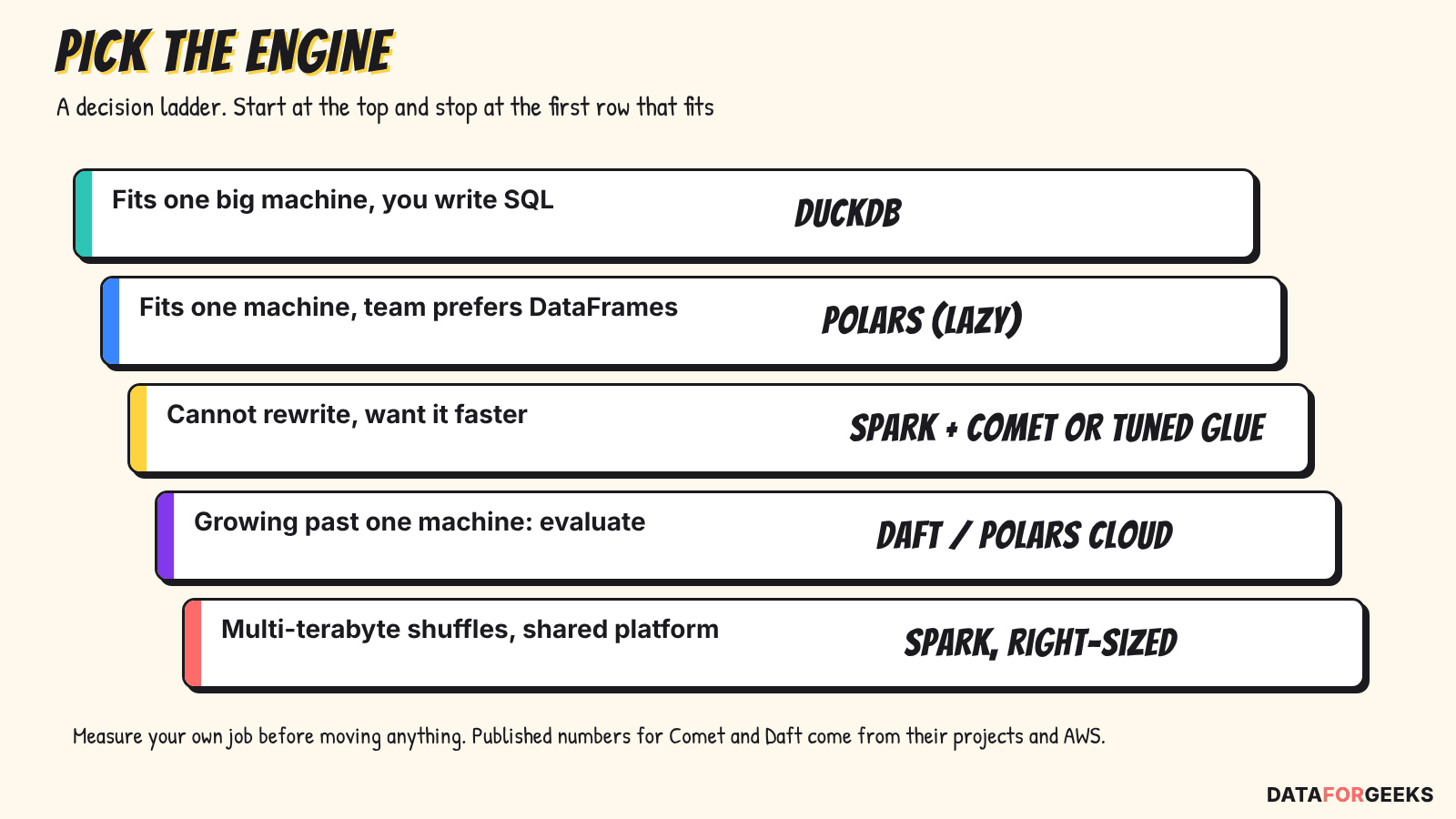
For a Spark overkill decision, start at the top of this ladder and stop at the first row that fits.
The question I now ask first
Why I’ve been waiting for this
The tools I wrote about in my tuning posts all assume the cluster is a given. What’s changed is that the single-machine option is now good enough to be a serious first question, with real SQL, real table formats and an LTS release. I’m not suggesting anyone rip Spark out. I’m suggesting the first question changes from “how do I tune this?” to “is Spark overkill here, or does this fit one machine?”
🦆 My take:
Spark isn’t wasting your money, and it isn’t always overkill. Defaults are the problem. Size the job, ask whether it needs a cluster, then measure instead of trusting any chart, including the ones in this post.
Summary
- Spark is overkill when small jobs pay its fixed costs: cluster start, billing minimums and idle workers.
- Independent tests found 3.4x to 4.1x gains at 40 GB and on small files, a mixed result at 100 GB, and Spark winning beyond one machine.
- In the toy job, right-sizing Spark (on Glue or EMR Serverless) saved most of the cost and the engine swap saved the rest. Databricks bills in DBUs, so measure yours.
- DuckDB suits SQL teams and Polars suits DataFrame teams. Pin versions for both in 2026.
- SQL is the thread that made every engine move survivable, from Hive to DuckDB.
- On the question of Spark overkill, measure your own job before moving it.
Sources: Databricks Jobs pricing, Digital Turbine, Niels Claeys, DuckDB 2.0 announcement, AWS Glue 6.0, and the AWS price lists.
Frequently asked questions
Is DuckDB faster than Spark for 100 GB of data?
Not reliably, and it's the size where Spark overkill stops being obvious. Not reliably. In a talk by Data Minded's Niels Claeys, DuckDB beat Spark on most queries of a 100 GB TPC-DS test on an 8 vCPU, 32 GB node and ran out of memory on the last one. At 40 GB, Digital Turbine measured DuckDB 4.1x faster than untuned Spark. Test your own job.
Is Spark overkill for daily transformations?
Often, yes. If the working set after filtering and the largest shuffle fit comfortably on one machine, start with DuckDB or Polars. If data, joins or shuffles outgrow one machine, or you need streaming and shared governance, use Spark, right-sized.
Polars vs Spark and DuckDB: which of these Spark alternatives is better?
Mostly a question of SQL against DataFrames. DuckDB has the best documented memory behaviour on very large Parquet files (codecentric, 2026) and spills joins and sorts to disk. Polars suits teams that write Python DataFrames, and Polars 2.0 now uses its streaming engine by default.
Can DuckDB write Iceberg or Delta tables?
DuckDB writes Iceberg through an attached REST-style catalog (insert, update, delete, merge, merge-on-read). For Delta it reads tables, including deletion vectors, and writes are limited to creating a table and appending rows.
Can I run my PySpark code on DuckDB?
Not reliably. DuckDB's PySpark-compatible API is experimental, gets only bug fixes, and is due to be deprecated in favour of SQLFrame, which did not yet support DuckDB 2.0. SQL is the safest code to carry over.
When is Spark not overkill?
Keep Spark for data beyond one machine (around 10 TB in Coiled's 2024 test), heavy shuffles, streaming, multi-tenant governance, and teams whose platform is already built on it. Among Spark alternatives that need no rewrite, accelerators such as Comet can speed Spark up.
Is DuckDB 2.0 safe to use in production now?
It is an LTS release as of 21 October 2026, but files written by 2.0 cannot be read by older versions and the project advises waiting for the first patch (2.0.1, planned for 18 November, tentative) for mission-critical work. Pin exact versions.
What changed in Polars 2.0?
The streaming engine is the default for collect(), row order is not guaranteed in joins and group-bys unless you set maintain_order, and many deprecated APIs were removed. Read the upgrade guide before moving.
How do I measure my job's working set?
In the Spark UI, open a typical run's stages and note the input size after filtering and the largest shuffle read and write. If both fit in about a quarter of one machine's memory, the job is a candidate to try on DuckDB or Polars.
Does this apply to Databricks?
Yes, the cost logic is the same. On the Premium plan in US East, Databricks Jobs Classic is $0.15 per DBU plus the EC2 machines, and Jobs Serverless is $0.35 per DBU with a one-minute minimum. Its pricing page lists typical start-up as 4 to 6 minutes for classic and serverless standard, and under a minute for performance-optimized serverless. Run your job once and read the DBUs it burns before comparing.
