Your coding agents are out of hand. Good.
Claude Code is refactoring something. Codex is halfway through a test run. A third agent has been sitting on an approval prompt for eleven minutes, waiting for a keystroke you didn’t know it wanted. And in a tab you forgot existed, a benchmark has been running since lunch. 🫠
Running multiple AI coding agents in parallel is the fastest way to ship right now, and the fastest way to lose track of everything. This guide shows two open-source terminal tools that fix both halves of the problem: Herdr to run and watch your agents, and Hunk to review what they wrote.
🧪 Tested, not just read about
herdr --version and hunk --version if something looks different.TL;DR (for the scrollers)
- 🐑 Herdr is a terminal multiplexer that knows whether each agent is working, blocked, done or idle. Agents keep running when you close the terminal, and agents can drive Herdr themselves.
- 🌳 Git worktrees are built in: one command gives each agent its own branch and folder.
- 🔍 Hunk is a review-first diff viewer. The agent’s reasoning sits above the code it explains, and your comments flow back to the agent.
- 🔌 One plugin connects them, so review opens in a keystroke.
⏱️ In a hurry? Jump to the 5-minute setup.
👋 Is this for you?
Not yet if you run one agent at a time and watch it work. Your current setup is fine. Bookmark this for when that changes.
Table of Contents
😵 Why running multiple AI coding agents gets messy
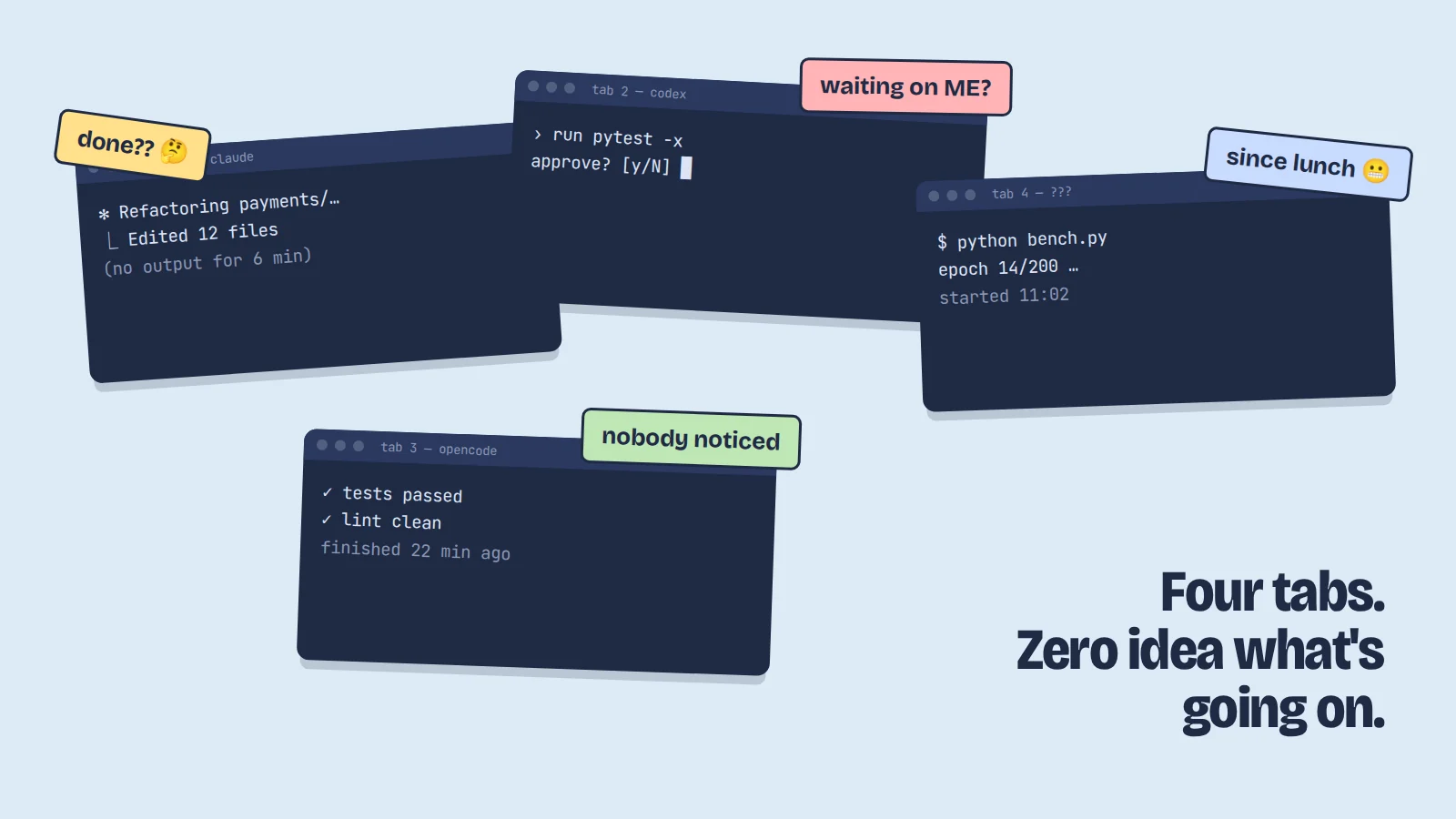
The problem isn’t too many terminals. It’s state you can’t see.
tmux will happily show you six panes. It has no idea whether the thing in pane 3 is compiling, waiting for your approval, or finished twenty minutes ago. You find out by looking. With one agent that’s fine. With five, looking is the job.
🐑 What is Herdr? A terminal multiplexer built for AI agents
Herdr (GitHub) is a terminal workspace manager for AI coding agents. Think tmux, if tmux knew what an agent was. It’s a single Rust binary, open source under Apache 2.0.
Step 1: How to install Herdr
curl -fsSL https://herdr.dev/install.sh | sh   # or: brew install herdr / mise use -g herdr
herdr
Linux and macOS, with a Windows preview build. The first launch walks you through notifications and optional agent integrations. herdr update keeps it current.
The refreshing bit: Herdr doesn’t replace your terminal. It runs inside Ghostty, Kitty, WezTerm, Alacritty, even inside tmux. No Electron app, no web dashboard.
💡 Pro tip: let your agent onboard you
Help me understand and set up Herdr. Read https://herdr.dev/agent-guide.md first, then walk me through it step by step.Step 2: Workspaces, tabs and panes
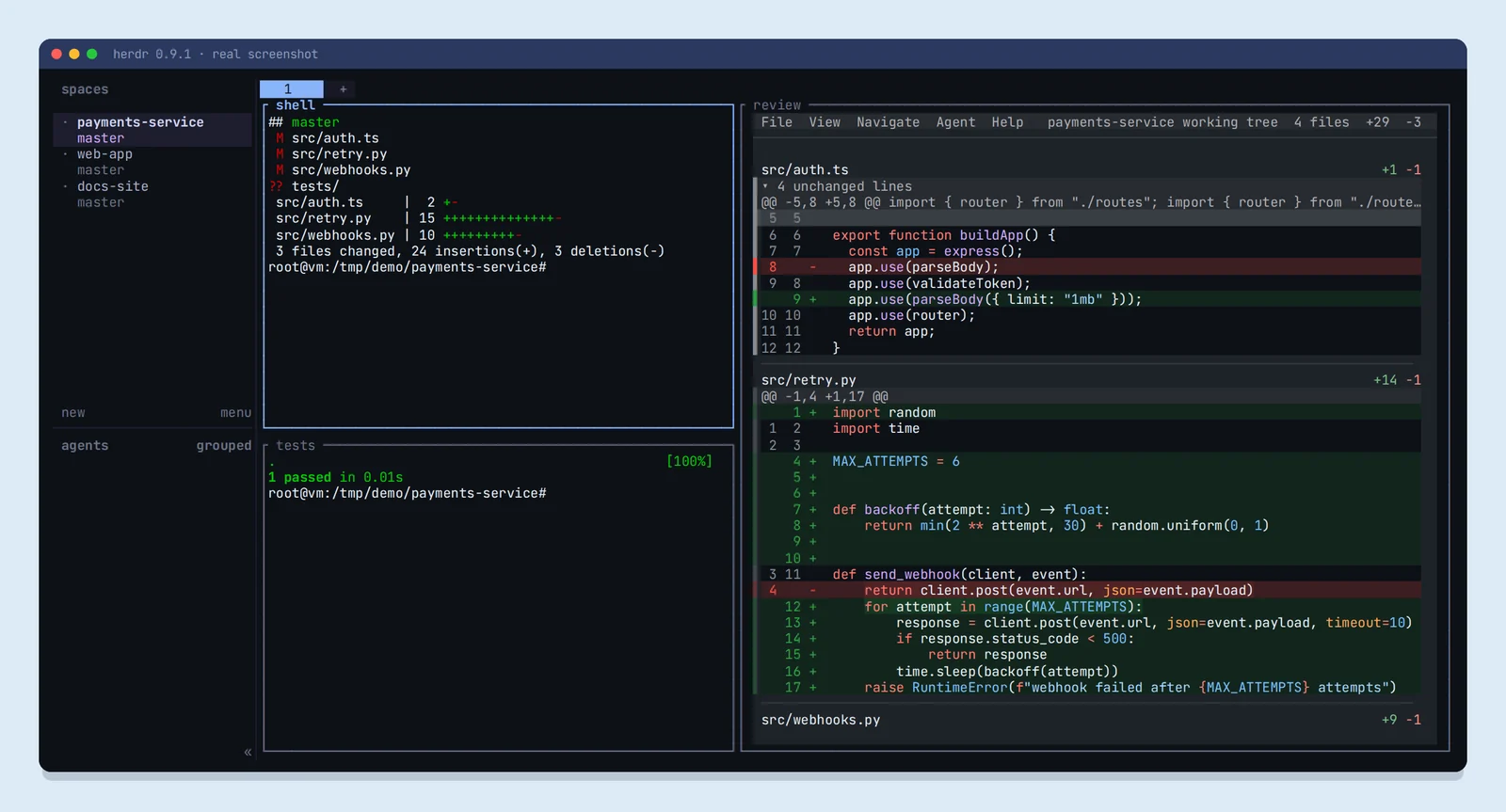
A workspace is a project. It names itself after the git repo. Tabs group panes inside it. Every pane is a real terminal: vim, htop and SSH all work, and you see the agent’s actual screen.
| Press ctrl+b, then… | What it does |
|---|---|
| shift+n | New workspace |
| shift+g | New worktree workspace |
| c | New tab |
| n / p | Next / previous tab |
| 1–9 | Jump to tab 1–9 |
| shift+t | Rename tab |
| v / - | Split pane |
| z | Zoom a pane |
| x | Close pane |
| b | Toggle sidebar |
| q | Detach (agents keep running) |
| ? | Show every keybinding |
Prefer the mouse? Click the sidebar, drag borders to resize, right-click for menus.
Step 3: How Herdr detects agent status
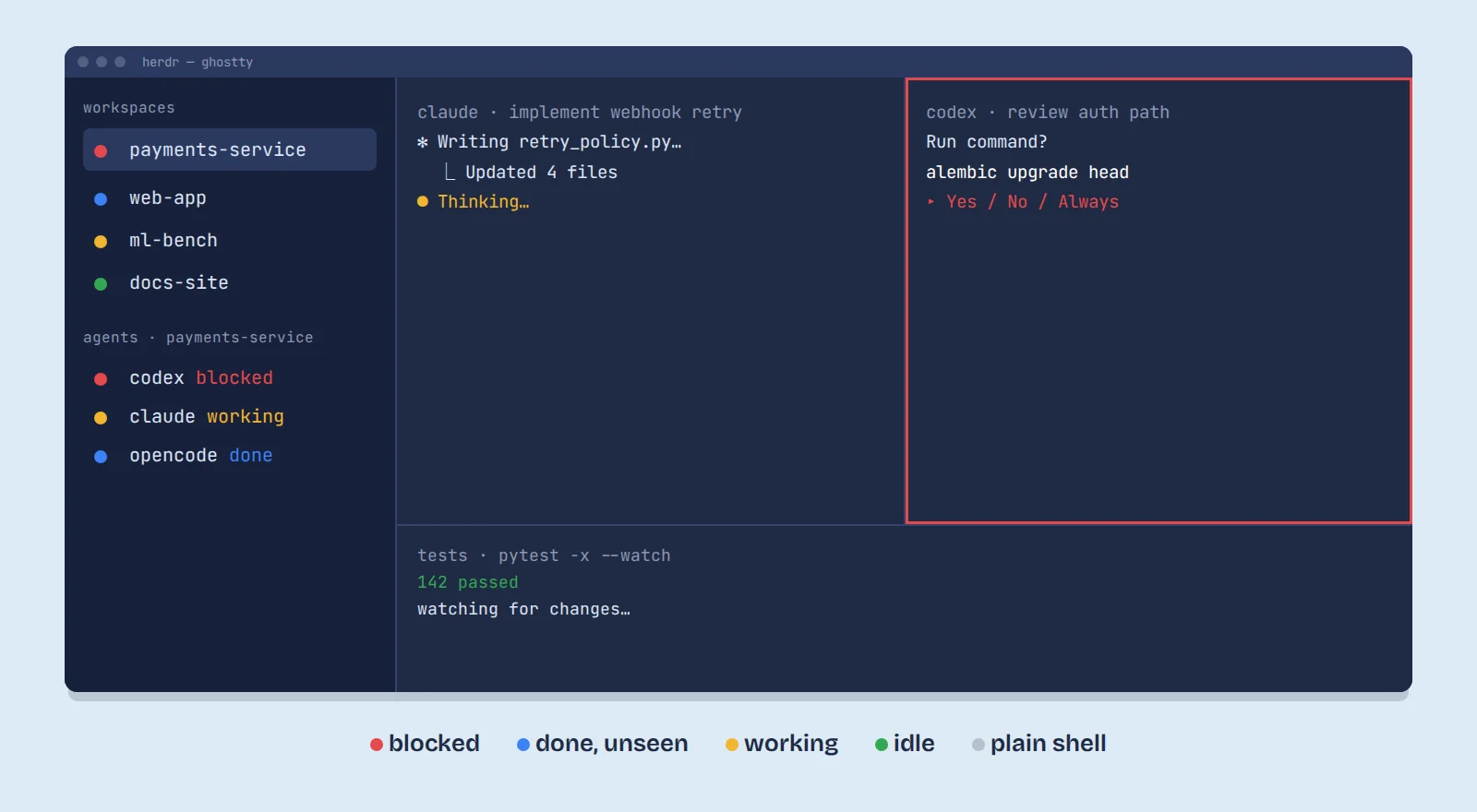
| Dot | Meaning | What you do |
|---|---|---|
| 🔴 | Blocked: needs input or approval | Go now |
| 🔵 | Done, and you haven’t looked yet | Review soon |
| 🟡 | Working | Leave it alone |
| 🟢 | Idle: done and seen | Nothing |
| ⚪ | Plain shell or unknown | Nothing |
The top of the sidebar rolls each workspace up into its most urgent dot. The bottom lists which agent is responsible. Scan, jump to red, act.
🤓 How does it know? No hooks needed
Want more precise states?
herdr integration install claude (also codex, opencode and others).Step 4: Detach and let your agents keep running
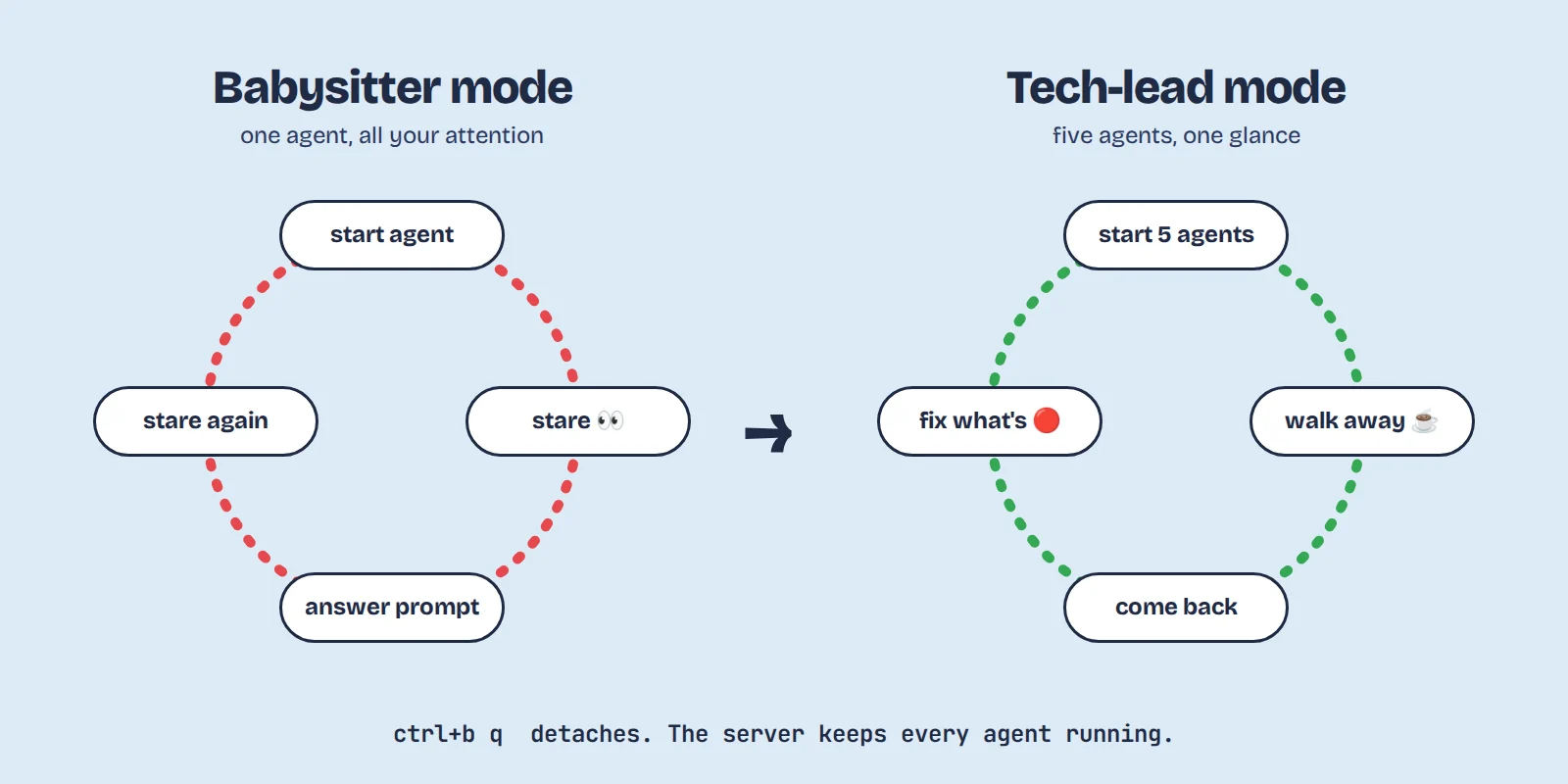
herdr                        # start, or reattach to your session
# ctrl+b then q              # detach: close the terminal, go get coffee
herdr --session experiments  # a separate named session
herdr server stop            # stop everything, on purpose
A background server owns every process, so closing the terminal or the laptop lid kills nothing. Notifications are tab-aware: the tab you’re looking at stays quiet, background tabs can still alert you.
Step 5: Let agents control Herdr
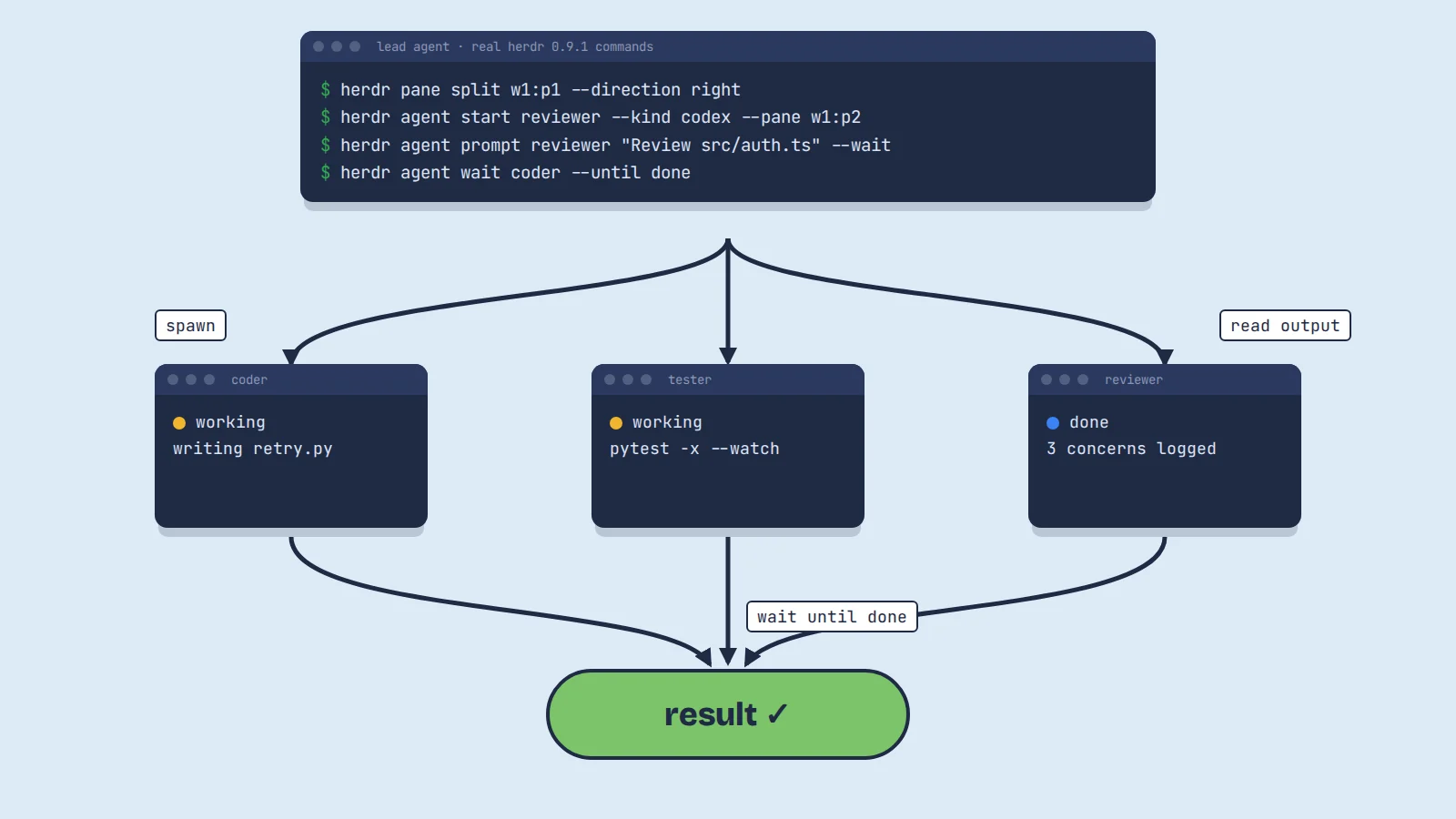
The same CLI you use is open to your agents. A lead agent can split panes, start other agents, send them prompts and wait for them:
herdr pane split w1:p1 --direction right
herdr agent start reviewer --kind codex --pane w1:p2
herdr agent prompt reviewer "Review src/auth.ts" --wait
herdr agent wait coder --until done
herdr pane wait-output w1:p3 --match "passed"   # wait for text in any pane
Give an agent the full playbook with herdr --skill, which prints Herdr’s built-in agent skill.
You’ve stopped prompting an agent. You’ve started staffing a team.
Share this line: 𝕏 Post it · LinkedIn
Step 6: Agents on other machines
Running a long job on a workstation or cloud VM? herdr --remote user@host attaches to a Herdr server over SSH, and herdr machine manages saved machines, so remote agents land in the same sidebar.
🌳 How to run parallel agents safely with git worktrees
Two agents in the same folder will eventually edit the same file. The fix is a git worktree: a second checkout of your repo on its own branch. Herdr builds this in:
herdr worktree create --branch retry-cap   # new branch + folder + workspace
herdr worktree list
herdr worktree remove ...                  # clean up when merged
In our test, that command created a real git worktree under ~/.herdr/worktrees/payments-service/retry-cap, opened it as a workspace, and nested it under its repo in the sidebar (you can see it in the plugin screenshot below). One agent per worktree, zero collisions. From the keyboard it’s ctrl+b then shift+g.
🛡️ A word on approvals
herdr agent prompt refuses to send to an agent that’s already blocked, so a script can’t accidentally type into someone’s approval prompt.🔍 What is Hunk? A diff viewer built for AI-written code
Your agents just touched 37 files. Hunk (GitHub) is a review-first terminal diff viewer made for exactly that moment. MIT licensed, and it works with git, Jujutsu and Sapling.
Step 7: Install Hunk and open your first review
curl -fsSL https://hunk.dev/install.sh | sh   # or: brew install hunk
                                              # or: npm i -g hunkdiff
hunk diff
hunk diff --watch # live-reloads while the agent keeps editing
hunk diff --staged # only what's staged
hunk show HEAD~1 # an older commit
hunk log # browse history
hunk diff --files before.ts after.ts # two files, directly
git diff --no-color | hunk patch - # any patch from stdin💡 Pro tip: make it your default pager
git config --global core.pager "hunk pager" and every git diff opens in Hunk.Step 8: Review the whole changeset in one stream
Normal terminal diffs give you a firehose. Hunk gives you one top-to-bottom stream with a file sidebar.
- [ and ] jump between hunks
- Click a file in the sidebar to land on it
--mode split,unifiedorautoto fit your terminal width- t opens the theme picker
--watchturns review into a live document while the agent is still typing
Step 9: See the agent’s reasoning next to the code
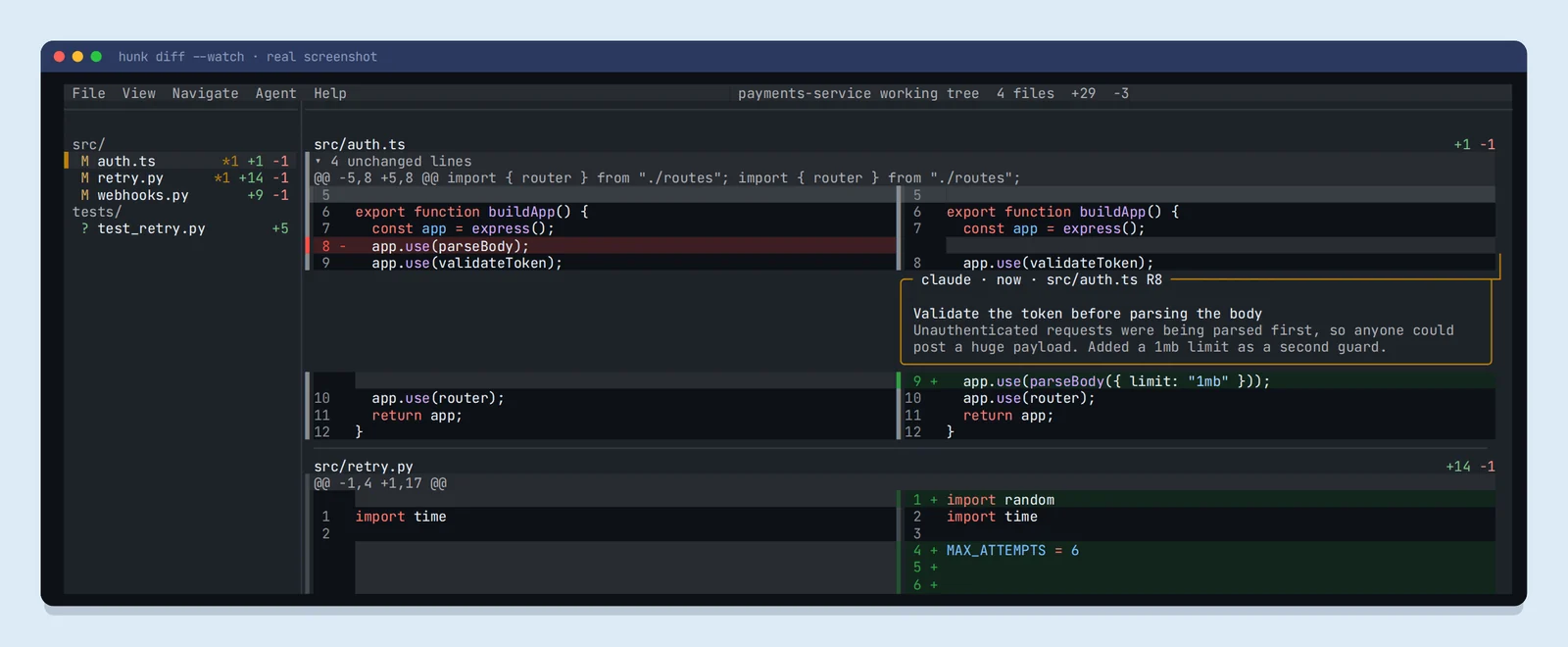
This is my favourite idea in either tool. 💜 An agent in another terminal can pin a note to any line of your live review:
hunk session comment add --repo . --file src/auth.ts --new-line 8 \
  --author claude --summary "Validate the token before parsing the body" \
  --rationale "Unauthenticated requests were being parsed first..." --focus
That’s exactly how the screenshot above was made. Agents can also write notes to a JSON file and you load them with hunk diff --agent-context notes.json. To teach an agent all of this, tell it: Load the Hunk skill. Run hunk skill path to get the skill path.
AI-written code isn’t the deliverable. Your understanding of it is.
Share this line: 𝕏 Post it · LinkedIn
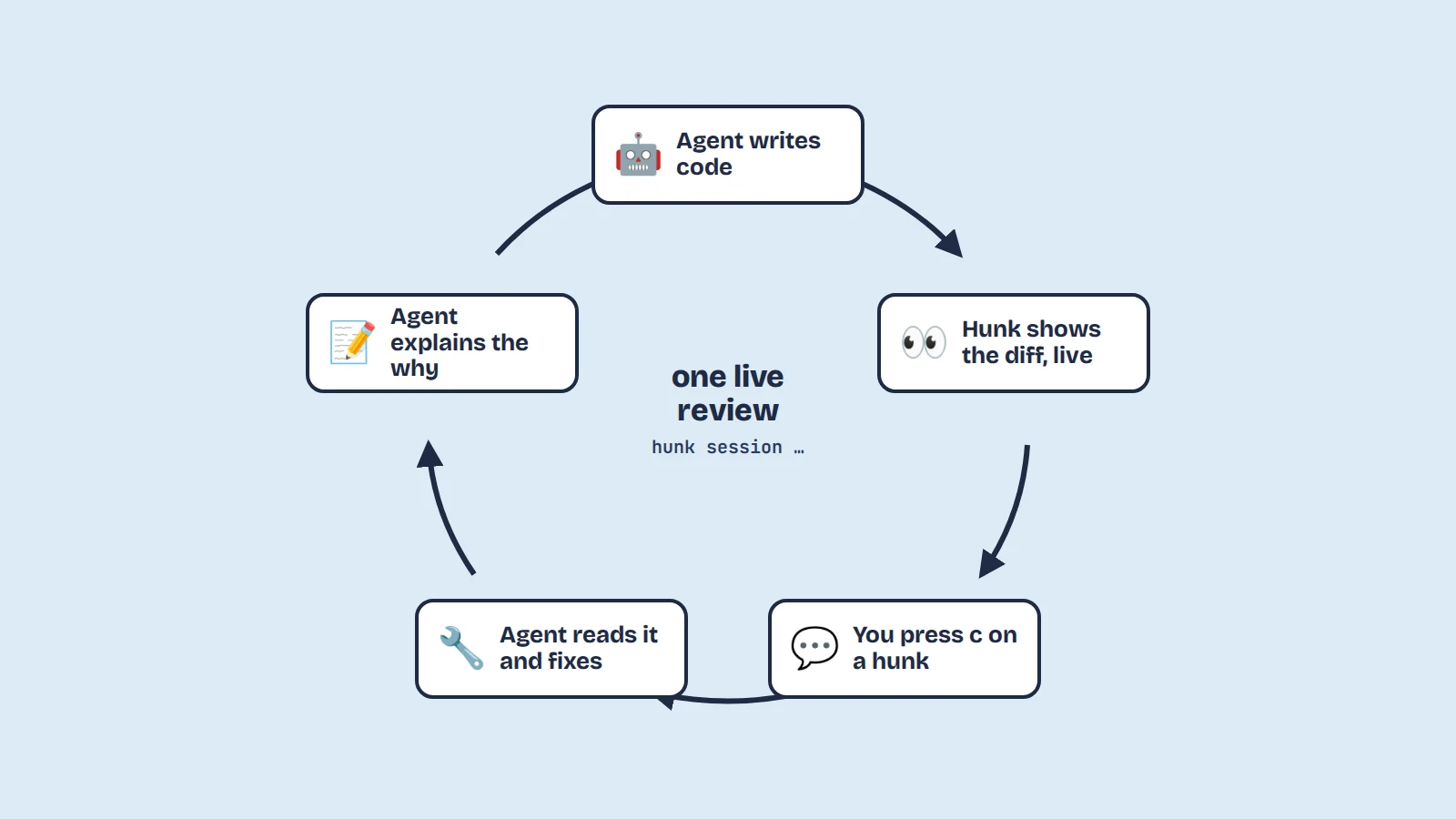
Step 10: Comment on a hunk and let the agent fix it
Spot something odd? Press c on the line, type, press ctrl+s.
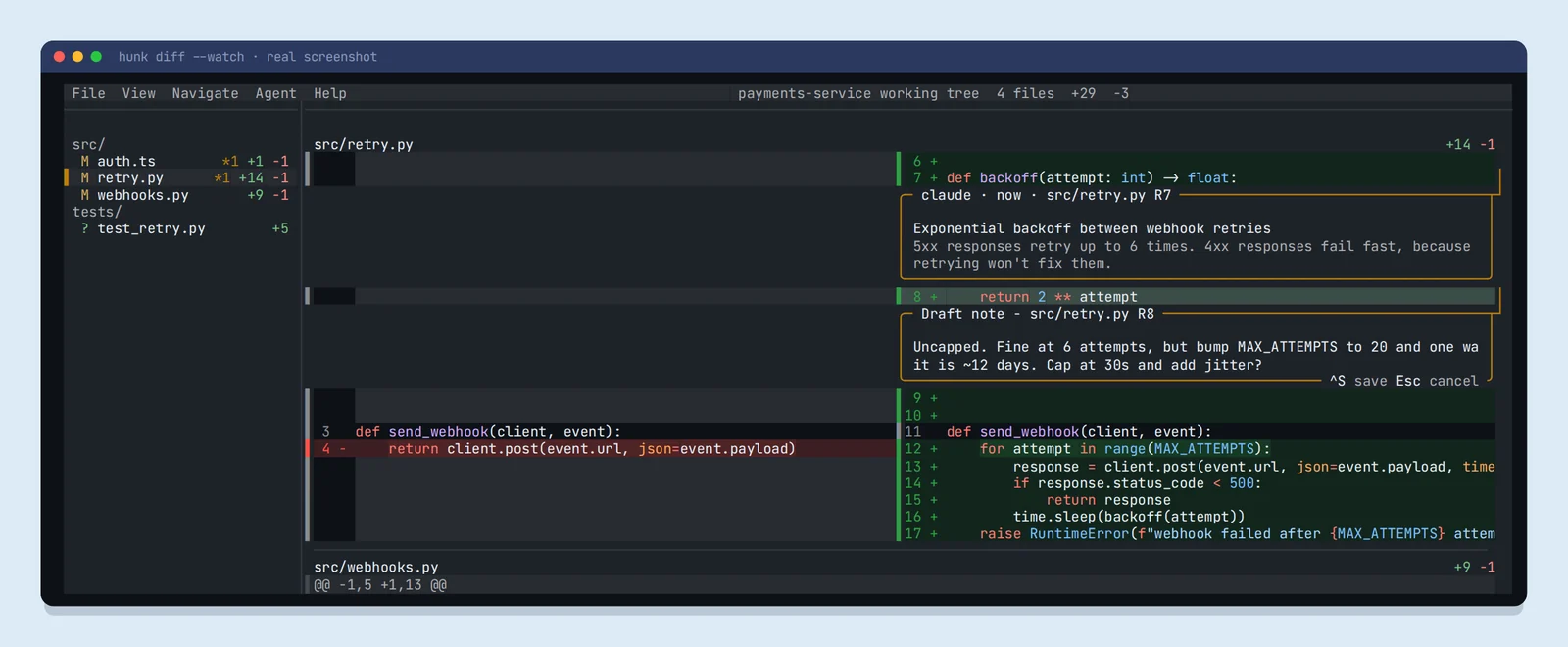
The agent picks up only your comments, fixes the code, and replies in the same thread:
hunk session comment list --repo . --type user
# ...agent edits src/retry.py...
hunk session comment add --repo . --reply-to <note-id> --author claude \
  --summary "Capped each wait at 30s and added up to 1s of random jitter"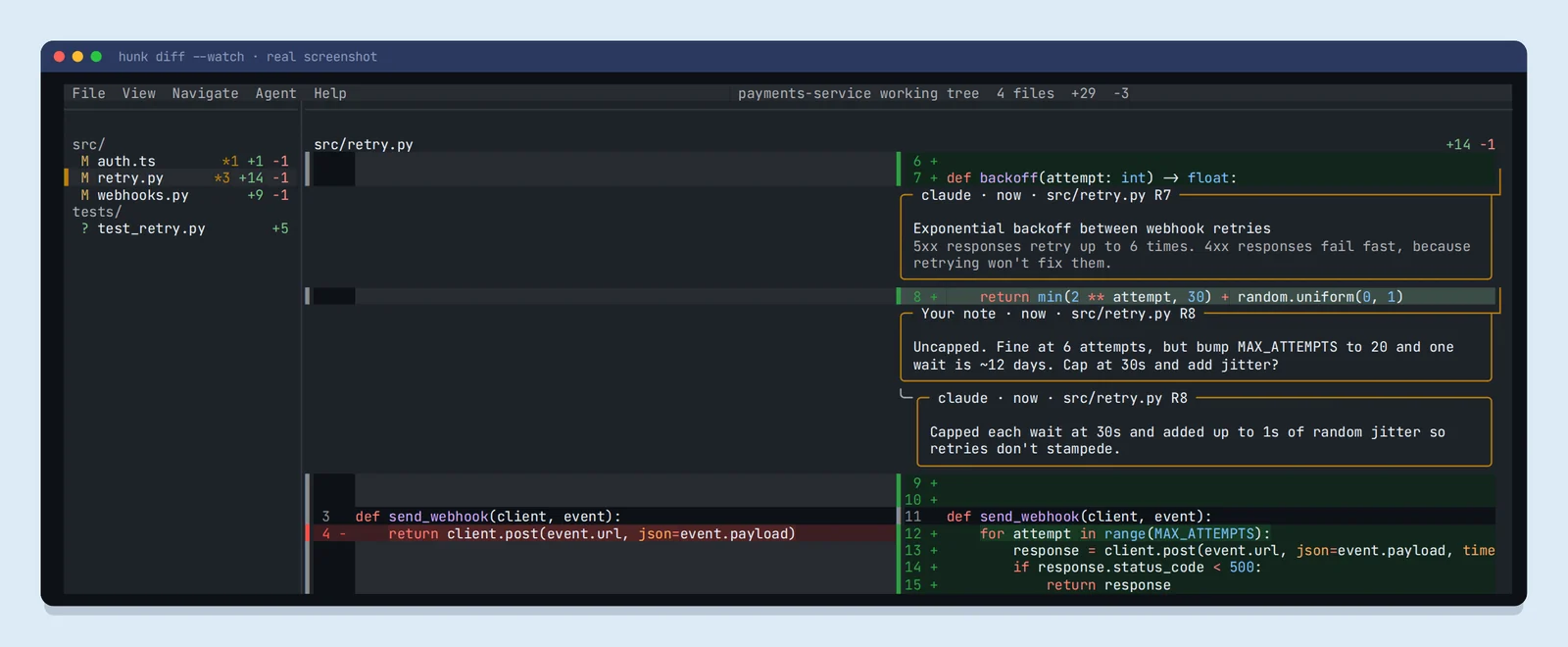
🔐 Your voice stays yours
🔌 Connect Herdr and Hunk with one plugin
You can run Hunk in any Herdr pane by hand. Or let a plugin do it. We tested cevr/herdr-hunk: one key opens a review, another sends your notes back to the agent that made the changes.
herdr plugin install cevr/herdr-hunk   # needs Bun installed
herdr plugin list
Then add two keys to ~/.config/herdr/config.toml and run herdr server reload-config:
[[keys.command]]
key = "prefix+alt+h"
type = "plugin_action"
command = "cvr.herdr-hunk.open"
description = "open Hunk review"

[[keys.command]]
key = "prefix+alt+s"
type = "plugin_action"
command = "cvr.herdr-hunk.send"
description = "send Hunk notes"
⚠️ Don’t copy the plugin README’s keys blindly
prefix+h and prefix+s. In Herdr 0.9.1 those already mean focus pane left and settings. The prefix+alt keys above are free, and we confirmed they work.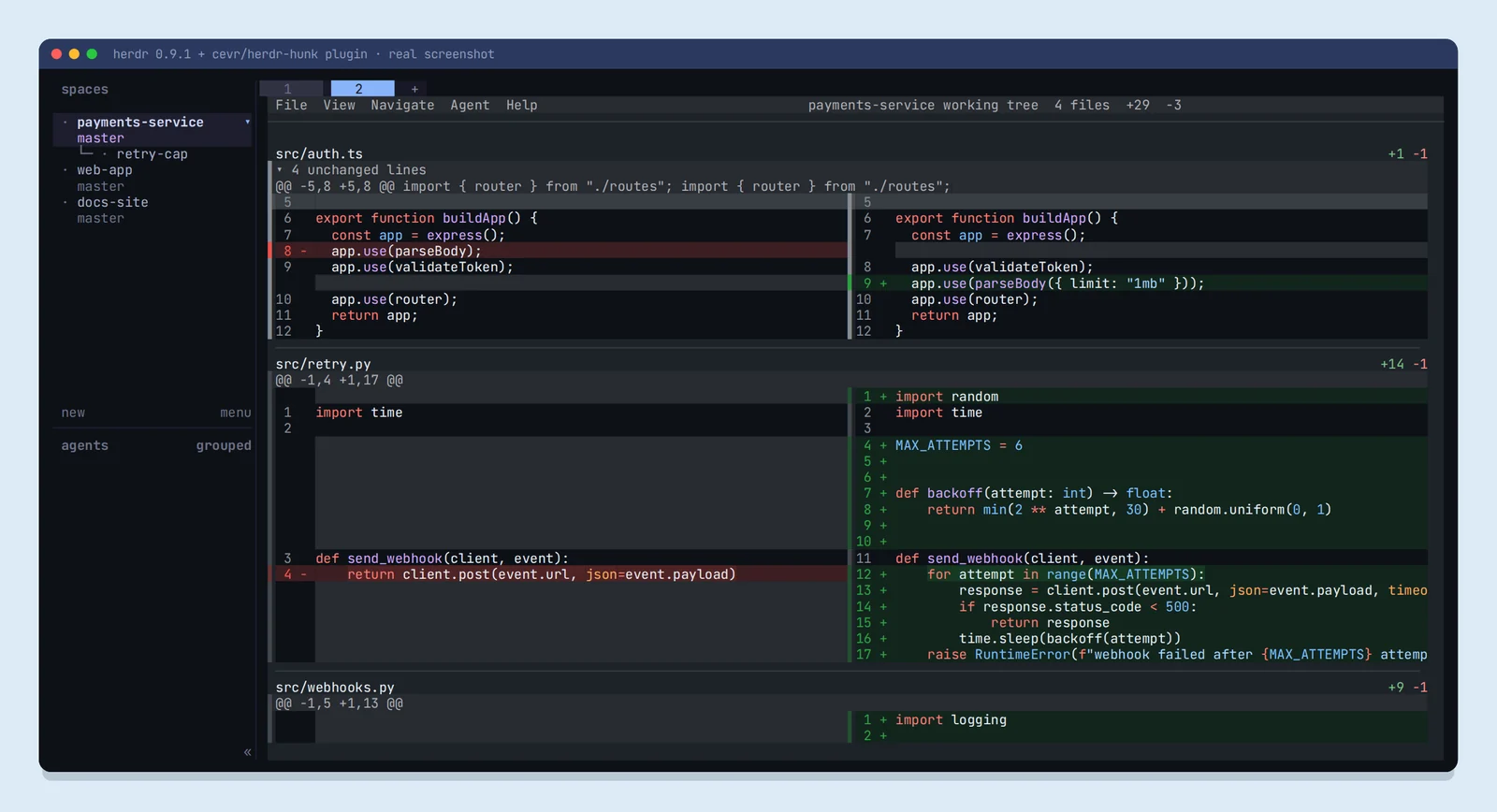
When you send notes, the plugin types them into the agent pane that opened the review, never broadcasts to other agents, and doesn’t press Enter for you, so you read the prompt first.
Other community plugins worth a look: yuucu/herdr-hunk (auto-refreshes the review when an agent finishes) and jhochenbaum/herdr-hunk-diff (opens the right worktree and routes comments back).
🤝 A real workflow, start to finish
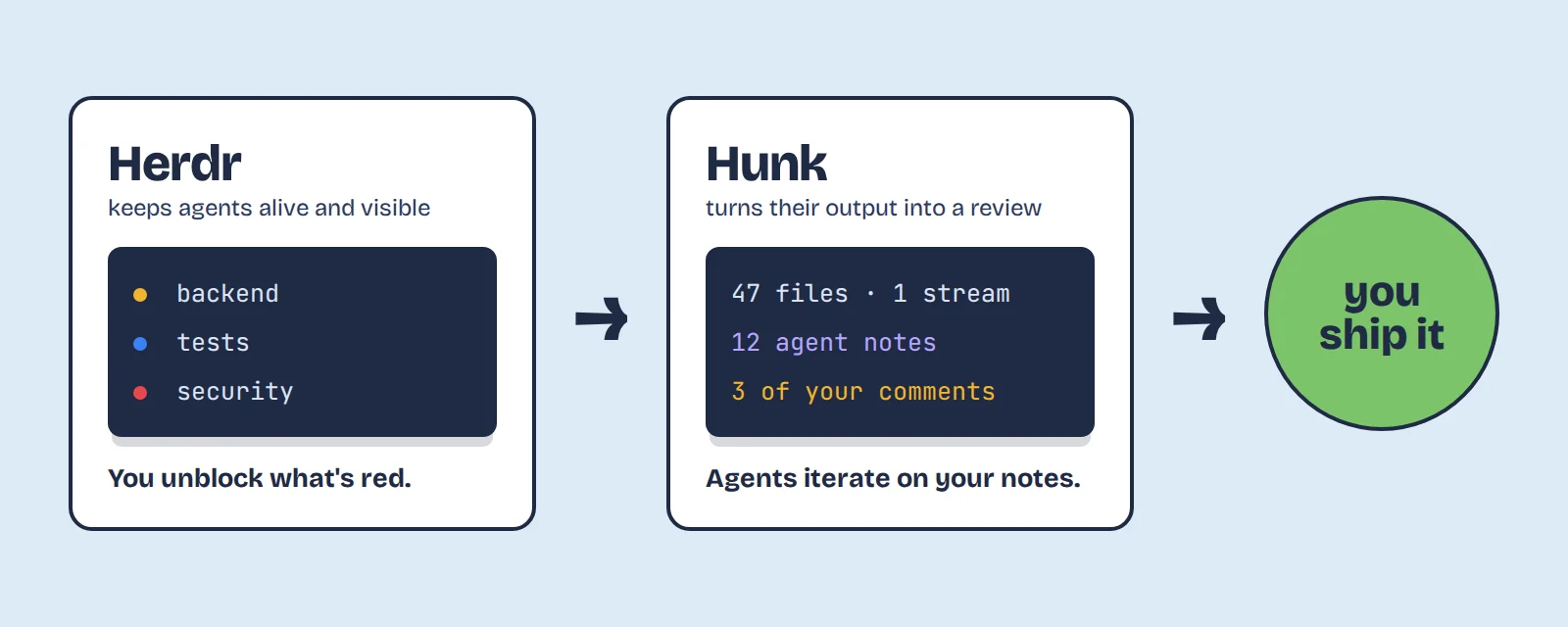
herdr, thenherdr worktree create --branch retry-capfor the new feature.- Start Claude Code on the feature in that worktree and Codex on tests in another.
- Detach with ctrl+b q. Go to your meeting. ☕
- Come back. One dot is 🔴: Codex wants to run a migration. Read it, approve it.
- Claude’s dot is 🔵. Press ctrl+b alt+h to open the review.
- Read the stream. The agent’s notes explain the tricky bits. Press c on anything suspicious.
- Press ctrl+b alt+s to send your notes to Claude. Watch the fix land live.
- Happy? Merge the worktree. You were the tech lead, not the typist.
⚖️ Herdr vs tmux: do you need both?
| Herdr | tmux | |
|---|---|---|
| Built for | AI coding agents | Any terminal work |
| Knows if an agent is blocked or done | Yes, per pane | No |
| Keeps processes running after you detach | Yes | Yes |
| Automation | CLI and socket API designed for agents to use | Mature command set, built for humans and scripts |
| Git worktrees | Built in (herdr worktree) | Manual |
| Plugins | herdr plugin install | Large ecosystem via TPM |
| Maturity | New and moving fast | Decades of stability |
Verdict: keep tmux for servers and general work. Use Herdr when agents are the thing you’re juggling. Herdr even runs inside tmux, so you don’t have to choose.
⚖️ Hunk vs delta vs difftastic
| Hunk | delta | difftastic | |
|---|---|---|---|
| Interactive review screen | Yes | No | No |
| Whole changeset in one stream with sidebar | Yes | No | No |
| Agent notes and comments inline | Yes | No | No |
| Syntax highlighting | Yes | Yes | Yes |
| Syntax-aware (structural) diffing | No | No | Yes |
| Works as your git pager | Yes | Yes | Yes |
| Best for | Reviewing agent changesets | Prettier everyday git diffs | Understanding tricky refactors |
Verdict: delta and difftastic make diffs nicer to read. Hunk makes them something you can review and discuss with an agent.
📋 Cheat sheet
| I want to… | Command |
|---|---|
| Install Herdr | curl -fsSL https://herdr.dev/install.sh | sh |
| Start or reattach | herdr |
| Detach, keep agents running | ctrl+b then q |
| New worktree for an agent | herdr worktree create --branch NAME |
| Start an agent in a pane | herdr agent start NAME --kind claude --pane ID |
| Wait for an agent | herdr agent wait NAME --until done |
| Teach an agent Herdr | herdr --skill |
| Switch tabs | ctrl+b n / p, or ctrl+b 1–9 |
| Install Hunk | brew install hunk or npm i -g hunkdiff |
| Live review | hunk diff --watch |
| Teach an agent Hunk | hunk skill path |
| Agent adds a note | hunk session comment add --repo . --file F --new-line N --summary "..." |
| Agent reads your comments | hunk session comment list --repo . --type user |
| Connect them | herdr plugin install cevr/herdr-hunk |
📄 Get this as a one-page PDF
⚠️ Before you install
Know these going in
- Licences: Herdr is Apache 2.0. Hunk is MIT.
- Platforms: Herdr runs on Linux and macOS, with a Windows preview. Hunk runs on macOS, Linux and Windows.
- Status detection reads the screen. Unusual agent setups can confuse it. Integrations make it more reliable.
- They move fast. Commands changed between versions while we wrote this. Check
--helpif something doesn’t match.
🎯 Key takeaways
- With many agents, the bottleneck is seeing what they’re doing, not starting them.
- Herdr turns check every terminal into scan one sidebar.
- Worktrees plus Herdr stop parallel agents from colliding.
- Hunk puts the agent’s reasoning next to its code, and turns review into a conversation.
- One plugin joins the two into a single loop.
❓ FAQ
Do I have to give up tmux to use Herdr?
No. Herdr runs inside your existing terminal, including inside tmux.
Can I run Claude Code and Codex at the same time?
Yes. Run each in its own Herdr pane, ideally in its own worktree. Herdr tracks both and shows which one needs you.
How do I stop two AI agents editing the same file?
Give each agent its own git worktree. In Herdr that’s one command: herdr worktree create –branch NAME.
Does Hunk only work with AI-written code?
No. It’s a full diff viewer for any changes. The agent features are an extra layer.
Are Herdr and Hunk free?
Yes. Both are open source: Herdr under Apache 2.0 and Hunk under MIT.
🔁 Bonus: agent in one tab, review in the other
My favourite everyday setup is the simplest one. One workspace, two tabs: the agent lives in tab 1, Hunk lives in tab 2, and you flip between them with one shortcut. Each tab gets the full screen, so the diff never has to squeeze next to the chat.
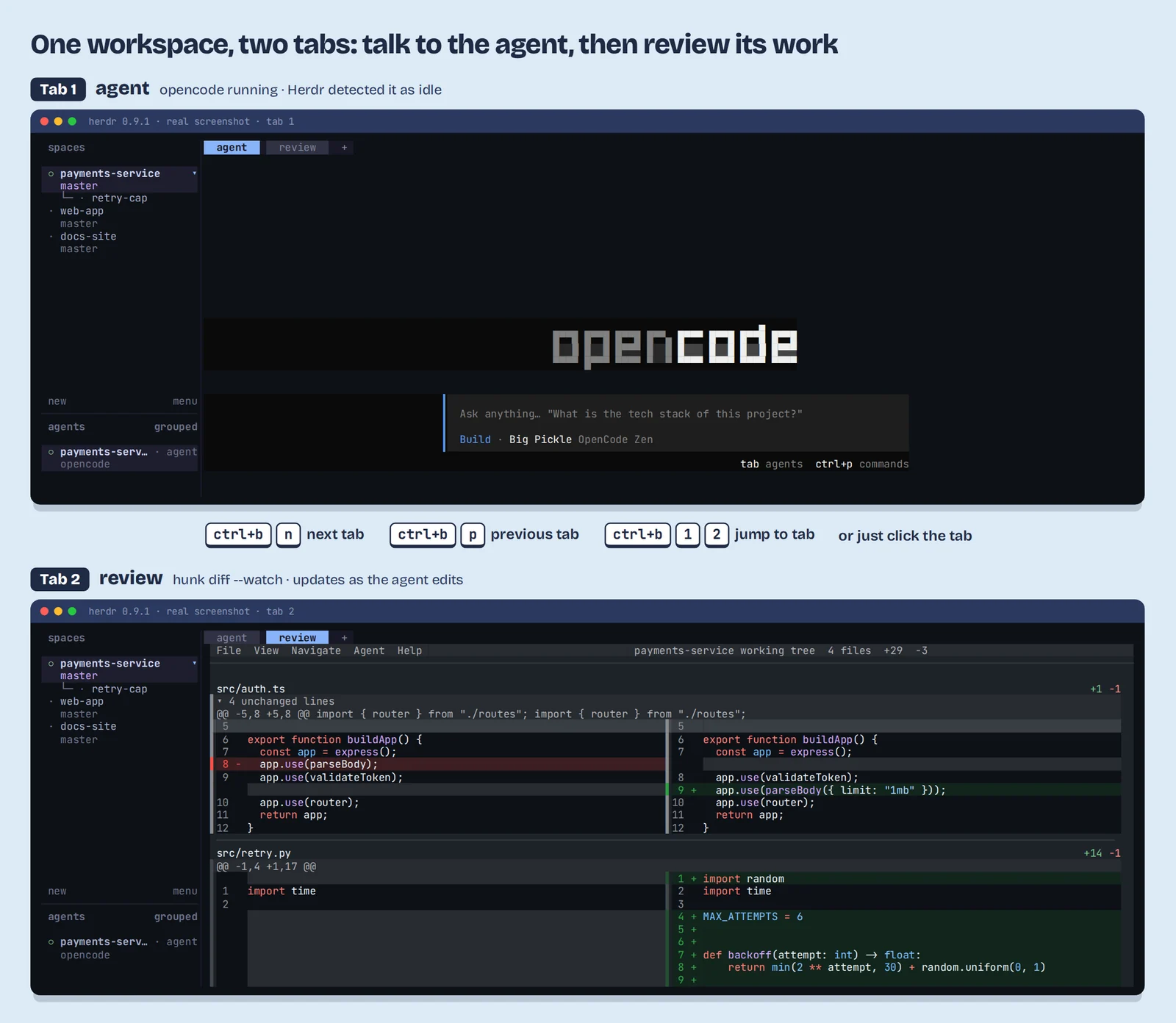
Set it up in 20 seconds
- Start your agent in the first tab. Rename the tab agent with ctrl+b shift+t.
- Press ctrl+b c for a new tab and name it review.
- In the review tab, run
hunk diff --watch. - Flip between them whenever you like. The agent keeps running in the background tab, and the review keeps reloading as it edits.
Prefer scripting it? The same setup from the command line:
herdr tab rename w1:t1 agent
herdr tab create --workspace w1 --label review --focus
# then, inside the new tab:
hunk diff --watch
Keyboard shortcuts for switching tabs
| Shortcut | What it does |
|---|---|
| ctrl+b then n | Next tab |
| ctrl+b then p | Previous tab |
| ctrl+b then 1–9 | Jump straight to tab 1–9 |
| ctrl+b then c | New tab |
| ctrl+b then shift+t | Rename the current tab |
| ctrl+b then shift+x | Close the current tab |
| Mouse | Click a tab name at the top |
⚡ Pro tip: switch tabs with one keystroke
[keys] section of ~/.config/herdr/config.toml, then run herdr server reload-config:switch_tab = "alt+1..9"Now alt+1 is your agent and alt+2 is your review, no prefix needed. Two things we found while testing: this replaces the default ctrl+b 1–9, and on macOS your terminal must treat Option as Alt (it’s a setting in iTerm2, Ghostty, Kitty and most others).
Why this works so well: while you’re reading the diff, Herdr’s tab-aware notifications still tell you if the agent in the other tab gets blocked or finishes. You never miss a beat, and you never have to split the screen.
🧠 The part that stuck with me
Herdr’s author had never written Rust before starting it. The tool was built almost entirely by AI coding agents, the same ones it exists to herd, with a human supervising the architecture.
That’s the whole thesis, running live: someone directed a team of agents to build the tool for directing teams of agents, in a language they didn’t know.
We got dramatically better models before we got anywhere good to put them. Herdr and Hunk are early work on that missing layer: the runtime, the review screen, the human-in-the-loop plumbing. That layer is where the next interesting year of developer tooling happens.
Share this line: 𝕏 Post it · LinkedIn
🔗 Try them: herdr.dev and hunk.dev
Running three agents at once with your own duct-tape setup? Tell me about it in the comments. 👇